Portfolio

Mosh Technology

B2B Website Redesign · WordPress

Case Study

B2B Website Redesign · WordPress + ACF + PHP · Industry 4.0

B2B Website Redesign · WordPress + ACF + PHP · Industry 4.0

Mosh Technology

Redesign

Mosh Technology

Redesign

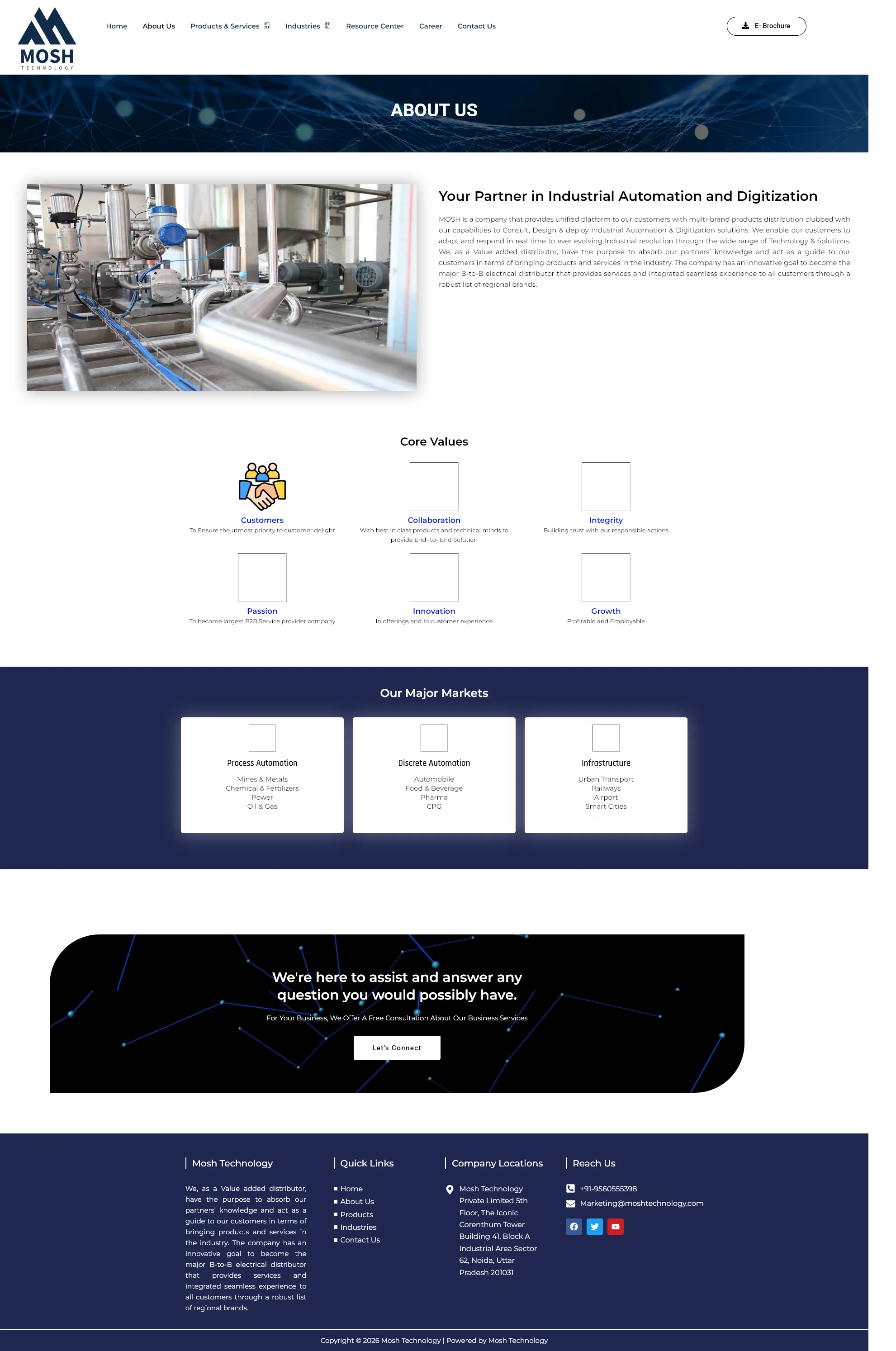
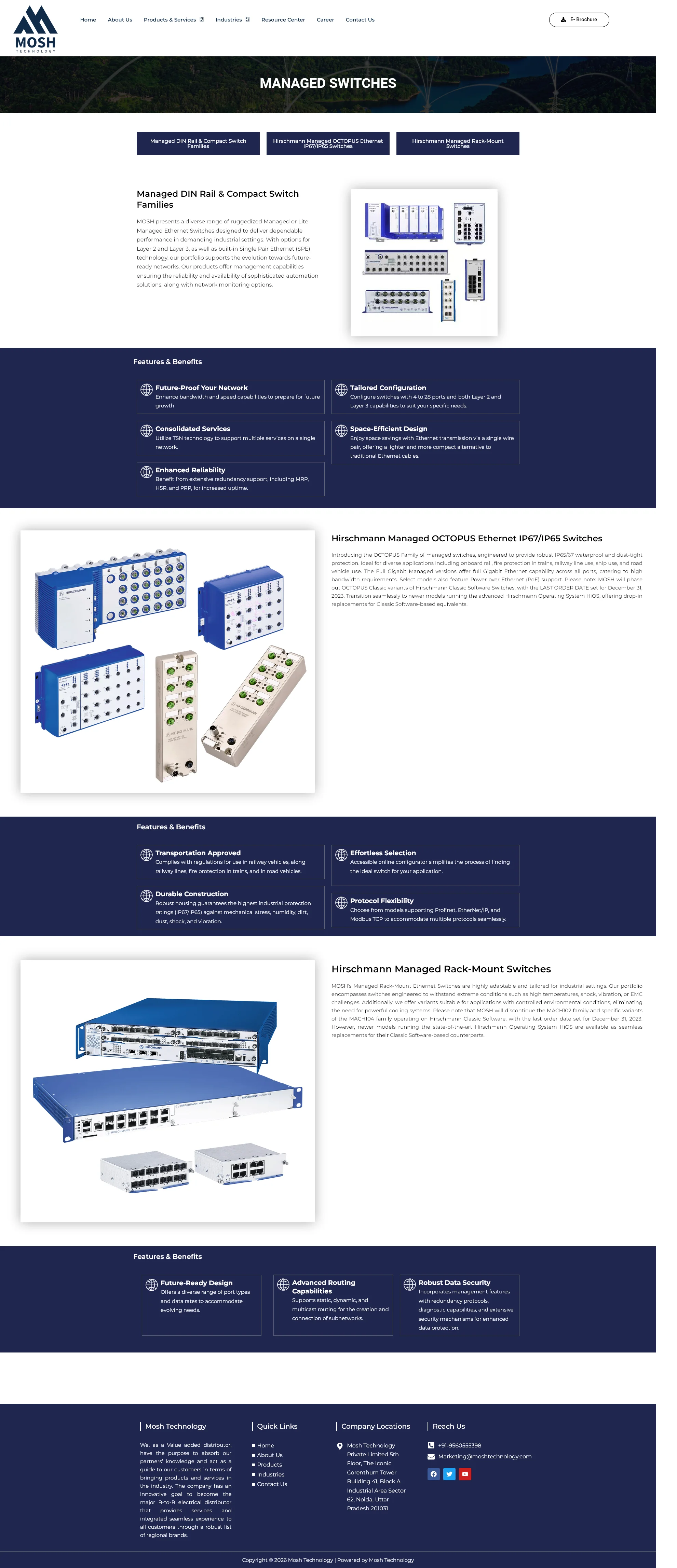
The old site had broken links, a slider from 2015, a YouTube button that nobody asked for, colors that clashed with the new logo, and a mobile view that just didn't work.

The old site had broken links, a slider from 2015, a YouTube button that nobody asked for, colors that clashed with the new logo, and a mobile view that just didn't work.

I redesigned the whole thing in Figma, then built it from

I redesigned the whole thing in Figma, then built it from

scratch in WordPress with ACF and custom PHP.

moshtechnology.com

Old Site

aquibtest.ustains.com

New Redesign

Full

Redesign — Figma to WordPress

ACF

+ Custom PHP code throughout

B2B

Industry 4.0 · Noida, India

Live

On test domain, ready to launch

New
New
New
New
Old
Old
New
New
New
New
New
New
Old
Old
New
New

Aquib Javed

Web Redesign · WordPress · Figma

Client

Mosh Technology Pvt. Ltd.

Noida, Uttar Pradesh

Mosh Technology Pvt. Ltd.

Noida, Uttar Pradesh

My Role

UI/UX Designer

+ WordPress Developer

UI/UX Designer

+ WordPress Developer

Scope

Full site redesign — Figma UX/UI

first, then WordPress build with ACF + PHP

Full site redesign — Figma UX/UI first, then WordPress build with ACF + PHP

Full site redesign — Figma UX/UI

first, then WordPress build with ACF + PHP

Tech Stack

WordPress · Elementor · ACF ·

Custom PHP · CSS

WordPress · Elementor · ACF ·

Custom PHP · CSS

Industry

Industry 4.0 · B2B · Industrial

Automation · Cybersecurity

Industry 4.0 · B2B · Industrial

Automation · Cybersecurity

01 — What this project was

A site that looked like

it was built in 2015

A site that looked like

it was built in 2015

A site that looked like

it was built in 2015

Mosh Technology is a serious B2B company. They distribute industrial networking hardware, build

Industry 4.0 solutions for factories, and work with brands like Cisco, Siemens, and Fortinet. Their

clients are engineers and procurement managers at manufacturing companies — people who know

their stuff.
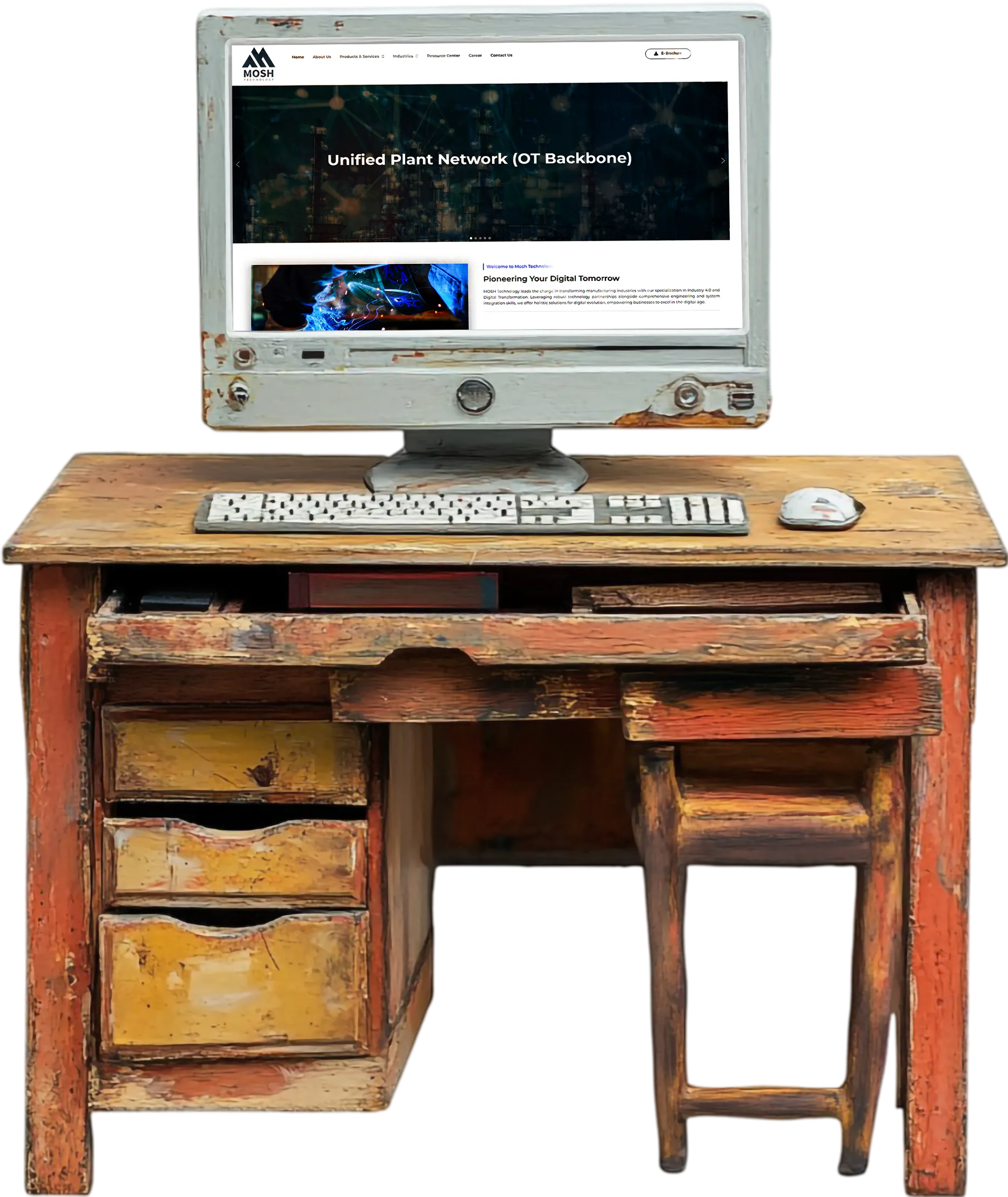
But their website didn't reflect any of that. The old site was full of problems — a clunky slider hero,

broken links everywhere, a YouTube video button nobody asked for, colors that clashed with their

updated logo, a footer that didn't work, and a mobile view that was basically unusable. For a company

trying to win B2B clients, the site was doing them real damage.

But their website didn't reflect any of that. The old site was full of problems — a clunky slider hero,

broken links everywhere, a YouTube video button nobody asked for, colors that clashed with their

updated logo, a footer that didn't work, and a mobile view that was basically unusable. For a company trying to win B2B clients, the site was doing them real damage.

They came to me for a complete redesign. Not a refresh — a full rebuild. Figma first, then WordPress.

My job was to take everything that was wrong and fix it properly, while also making the site actually

reflect how credible and technical their work is.

They came to me for a complete redesign. Not a refresh — a full rebuild. Figma first, then WordPress. My job was to take everything that was wrong and fix it properly, while also making the site actually reflect how credible and technical their work is.

— The core thinking behind this redesign

"

"When your clients are engineers buying industrial automation

solutions worth lakhs of rupees, your website can't look like a

WhatsApp forward. It has to feel like you know what you're doing."

"When your clients are engineers buying industrial automation

solutions worth lakhs of rupees, your website can't look like a

WhatsApp forward. It has to feel like you know what you're doing."

02 — Everything wrong with the old site

I audited the old site.

It had a lot going on.

I audited the old site.

It had a lot going on.

I audited the old site.

It had a lot going on.

Before I opened Figma I spent time going through the old site properly — clicking every link, checking

every section on mobile, reading every piece of content. Here's what I found.

Visual Design

Colors clashing with the new logo

Mosh had updated their logo but the website still

used the old color palette. The brand colors didn't

match — header colors, button colors, accent

colors all clashing with what the logo looked like.

The site looked like it belonged to a different

company.

→ Broken brand consistency throughout

Hero Section

Old school slider nobody wanted

The hero was a big image slider with rotating slides

— the kind of thing every website did in 2014. It's

slow, users don't interact with it, and it doesn't

communicate anything clear about what Mosh

actually does. It just looks outdated.

→ First impression failure

Homepage Content

Same content repeated over and over

The About Us section on the homepage used the

exact same text and imagery across multiple

sections — copy-pasted blocks with no variation.

Scroll down and you'd see the same paragraph

again. It looked like someone hadn't finished

building the page.

→ No credibility, no new information

as you scroll

Navigation & Links

Links that go nowhere — literally

A huge amount of the site's links were just `#` —

placeholder links that do nothing when you click

them. For a B2B site where a potential client is

trying to find a specific product or contact someone,

this is a serious problem. It looks unfinished and

untrustworthy.

→ Users clicking dead ends throughout

Footer

Footer links and form not working

The footer — one of the most visited parts of any

B2B site, because that's where people look for

contact info — had broken links and a contact form

that didn't submit. If someone wanted to reach

Mosh after reading the site, this was a dead end.

→ Lead generation completely broken

Video Section

Button that opens a YouTube video

There was a play button overlaid on an image on

the homepage. When you clicked it, it opened a

free YouTube video — not a professional company

video, just a general industry video. No branding. It

looked like a mistake, not a feature.

→ Confused and unprofessional

Mobile

Mobile view was broken

On mobile — which is how a lot of B2B decision-

makers first look at a site — the layout was a mess.

Elements overlapping, text too small, navigation

unusable. For a modern company, a broken mobile

experience in 2024 is simply not acceptable.

→ Unusable on phones

Image / Video Overlap

Image overlapping the video section

One section had an image element sitting on top of

the video area — clearly an unintentional layout

bug that had never been fixed. It looked broken

because it was broken. Small thing, big impression.

→ Visual bug visible to every visitor

Overall

Didn't reflect the company's actual

credibility

Mosh works with serious industrial clients on

complex automation projects. Their partners

include Cisco, Siemens, ABB, Fortinet. The old

website didn't communicate any of that weight. It

looked like a small distributor with no technical

depth — the complete opposite of what they

actually are.

→ Undermining the brand at every

touchpoint

Website Old design
Loading...

03 — Before & After

Every problem fixed.

Side by side.

Every problem fixed.

Side by side.

Every problem fixed.

Side by side.

Hero

old site

Rotating image slider — slow, outdated, no clear message

No clear value proposition above the fold

New design

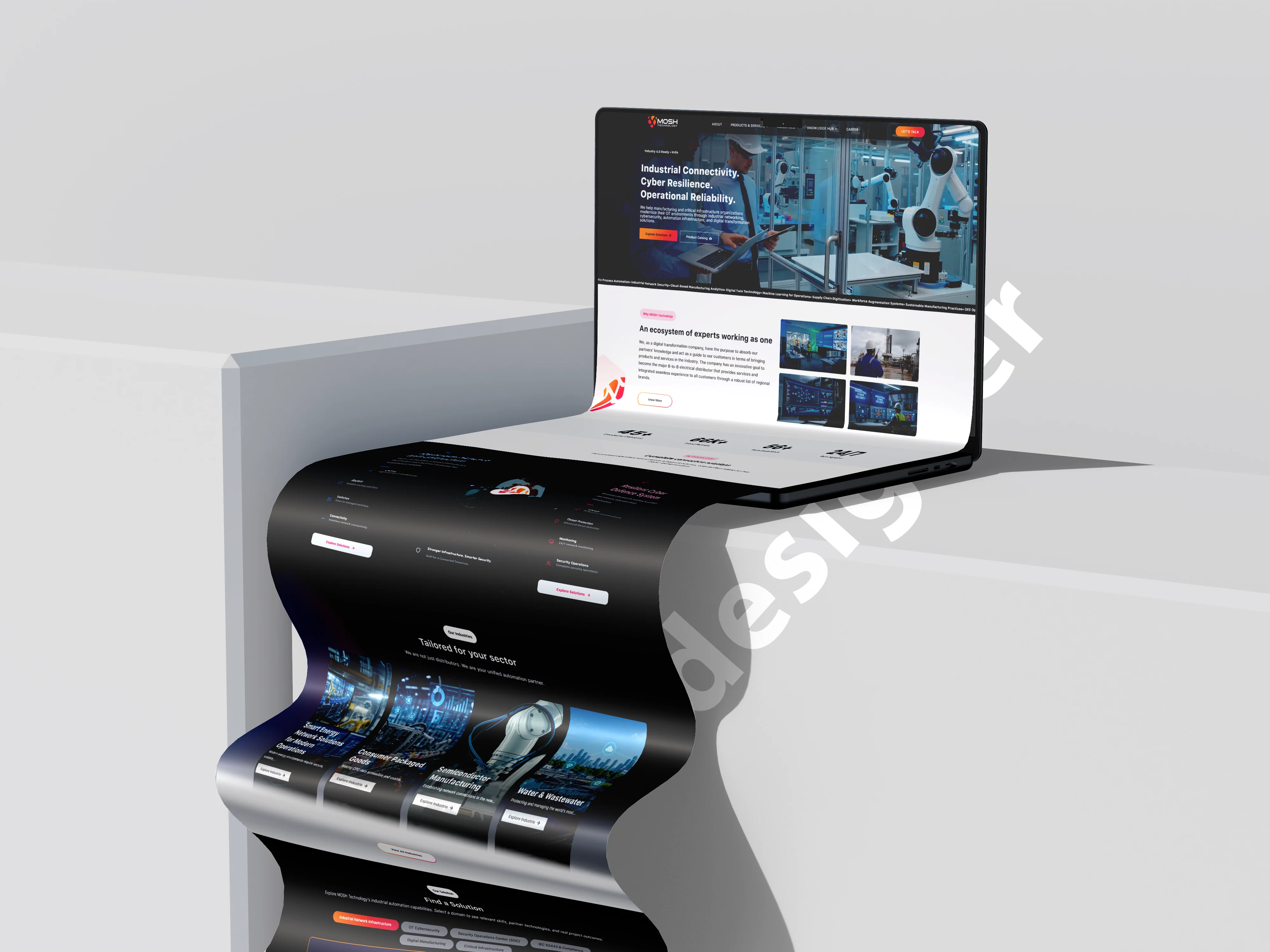
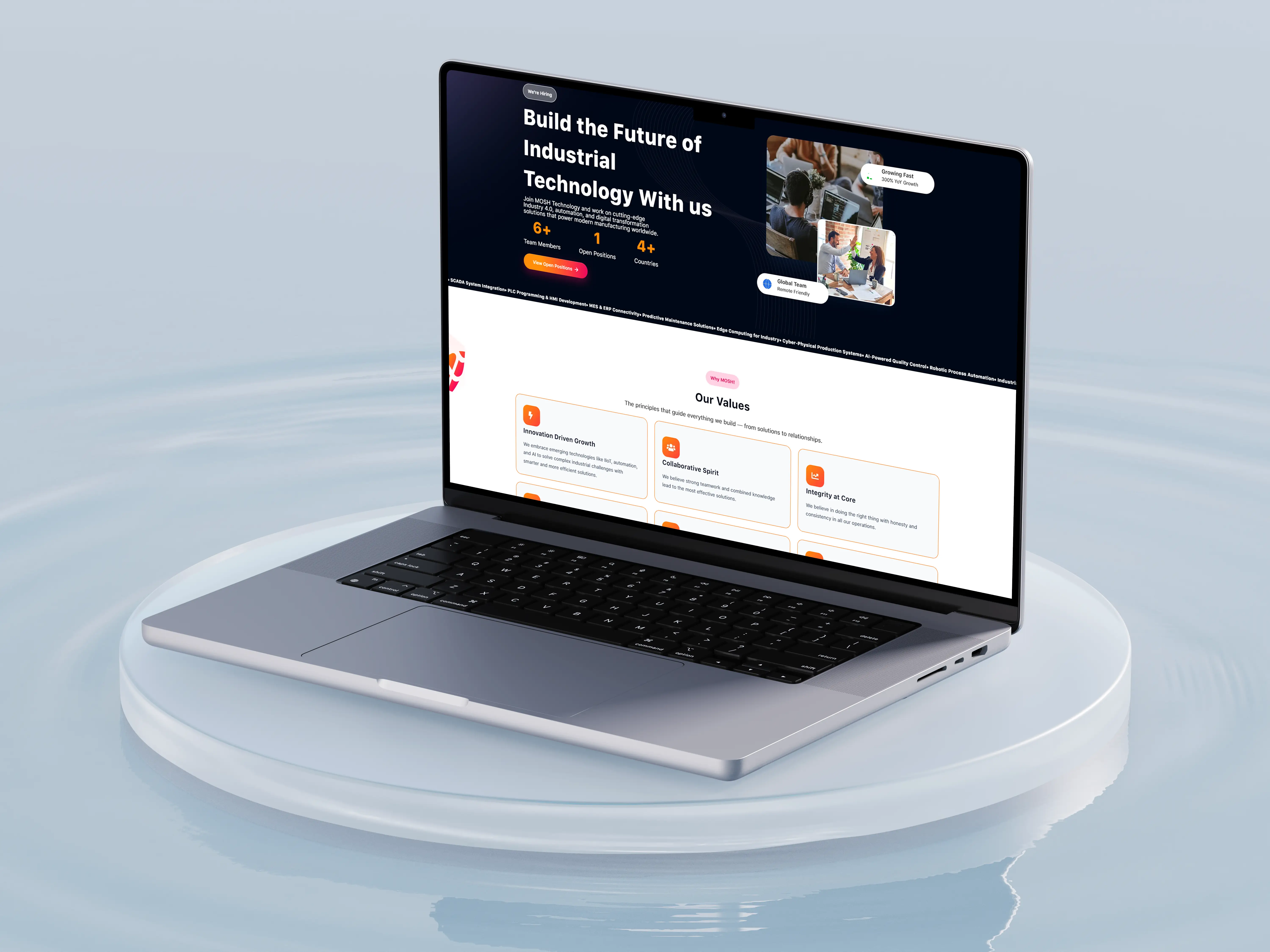
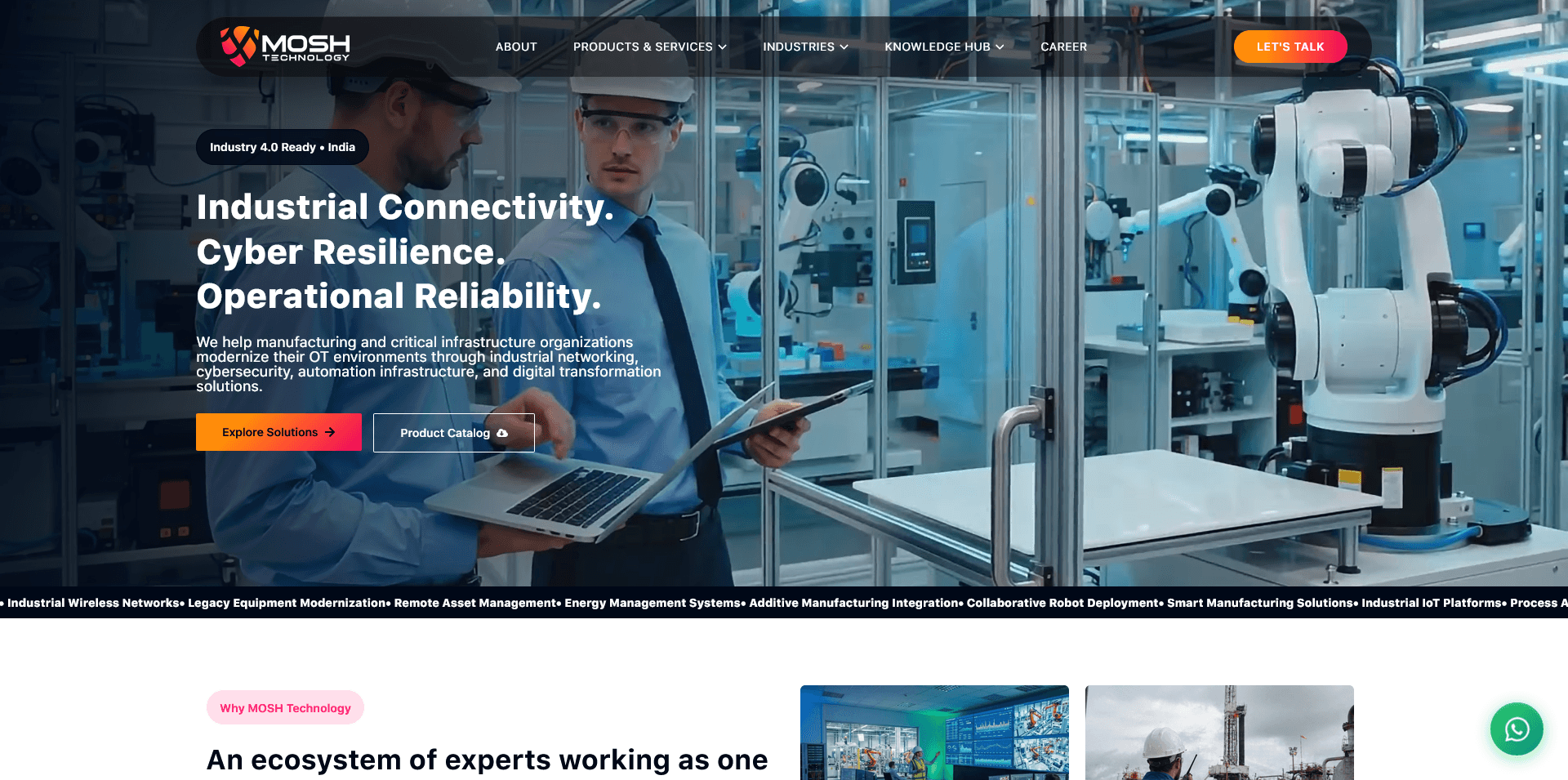
Strong headline: "Industrial Connectivity. Cyber Resilience. Operational Reliability."

Animated ticker of capabilities below the hero — no guessing what they do

Navigation

old site

Most links are # placeholders — click and nothing happens

Mega menu with no logical grouping

New design

Every link goes somewhere real — About, Products, Industries, Blog, Case Studies, Career, Contact

Clean nav with a "Let's Talk" CTA button always visible

Brand & Colors

old site

Color palette clashing with updated logo

No consistent visual language across pages

New design

Full color system designed to match the new logo — consistent across every page

Dark/light sections balanced with proper contrast ratios

Homepage Content

old site

Same About Us text repeated in multiple sections

YouTube video button with no branded content

New design

"Two Divisions, One Mission" — clear story structure as you scroll

Interactive Solutions section with tabs — Edge, Networking, Cybersecurity, Automation

Products

old site

Products buried in a deep mega menu — hard to find

YouTube video button with no branded content

New design

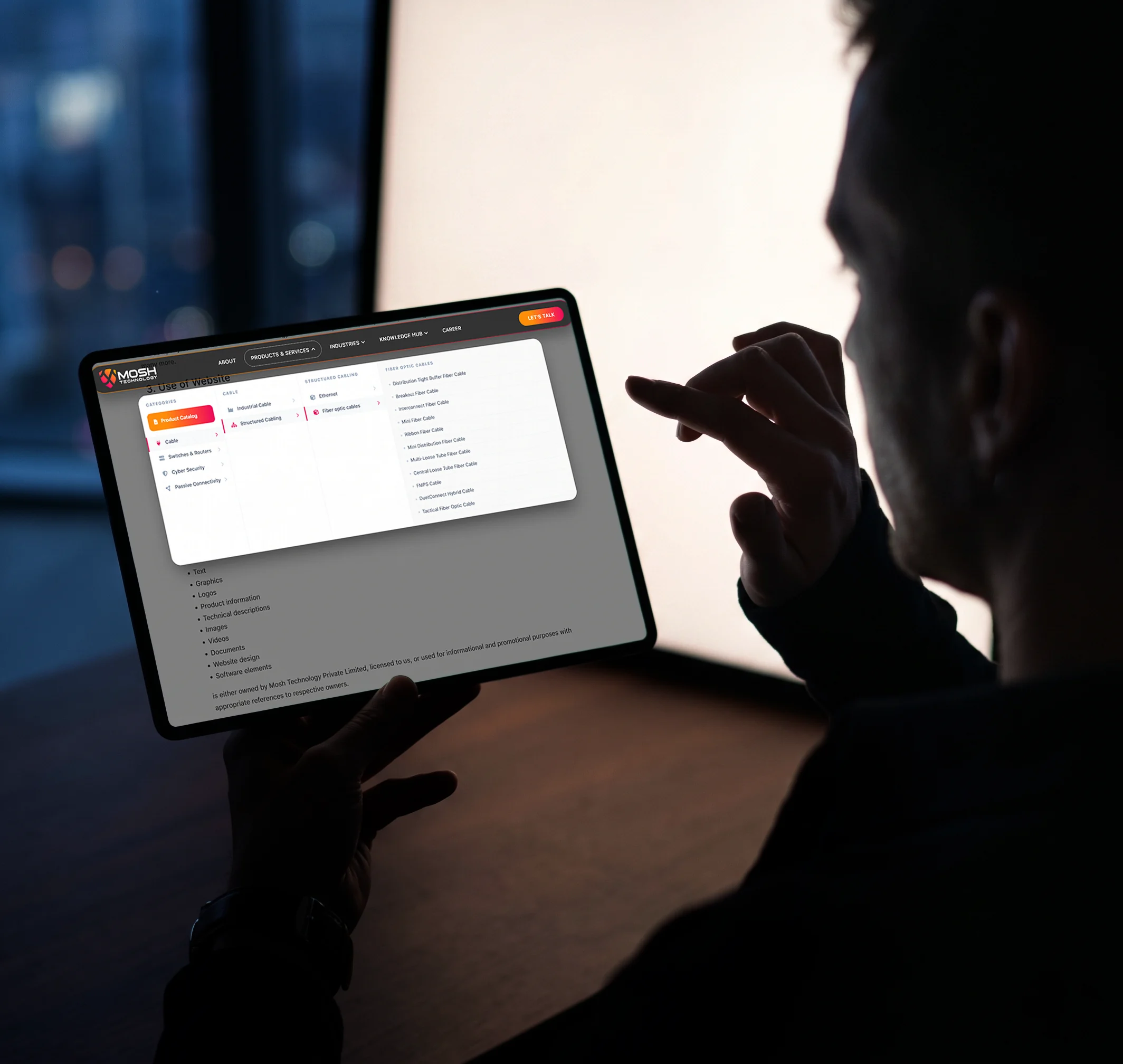
Product cards on homepage — Cable (124), Switches (64), Cybersecurity (84), Connectivity (124)

Filterable product catalog page — ACF-powered, dynamic

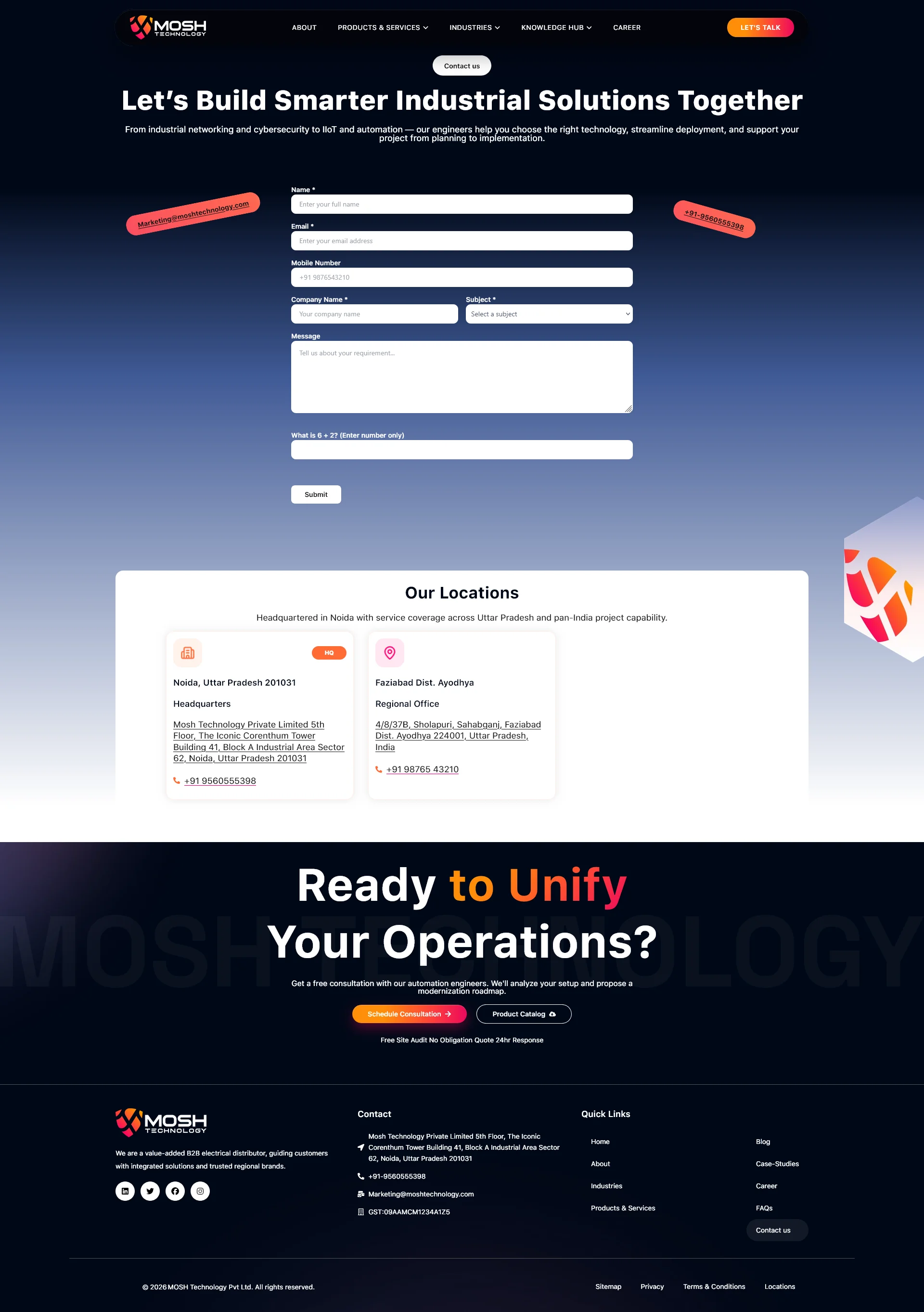
Footer & Forms

old site

Footer links broken or going nowhere

Contact form not submitting

New design

Footer fully built — sitemap, privacy, T&C, location pages all live

Contact form working, WhatsApp CTA, GST number, proper legal pages

Mobile

old site

Layout broken on mobile — elements overlapping, text too small

Navigation unusable on phone screens

New design

Fully responsive — designed mobile-first in Figma before desktop

Mobile nav with hamburger menu, proper touch targets

Content Depth

old site

No blog, no case studies, no industry pages with real content

New design

Blog, Case Studies, Industries, Knowledge Hub, Career, FAQ — all built and structured with ACF

04 — What I actually built

Every section, every page,

designed then built

Every section, every page,

designed then built

Every section, every page,

designed then built

This wasn't just a visual redesign. I built the entire site architecture from scratch — new page

templates, custom post types with ACF, custom PHP for dynamic product filtering, proper responsive

CSS. Here's what went into it.

01

Homepage — completely rebuilt

New hero with a clear headline and animated capabilities ticker. "Two Divisions,

One Mission" section. Interactive Solutions tab panel. Product category cards with

live counts. Industries strip. Case study previews. FAQ accordion. Blog section.

Consultation CTA at the bottom. Every section designed with a purpose.

New hero with a clear headline and animated capabilities ticker. "Two Divisions,

One Mission" section. Interactive Solutions tab panel. Product category cards with live counts. Industries strip. Case study previews. FAQ accordion. Blog section. Consultation CTA at the bottom. Every section designed with a purpose.

ACF

Custom PHP

Elementor

02

Product catalog with dynamic filtering

Built a filterable product catalog using ACF custom post types and PHP. Products

are grouped by category — Cable, Switches & Routers, Cybersecurity, Passive

Connectivity — with live filtering. Product counts update dynamically. Each product has its own template page. No hardcoded content — everything editable from the WordPress admin.

Built a filterable product catalog using ACF custom post types and PHP. Products are grouped by category — Cable, Switches & Routers, Cybersecurity, Passive Connectivity — with live filtering. Product counts update dynamically. Each product has its own template page. No hardcoded content — everything editable from the WordPress admin.

ACF

Custom Post Types

PHP Filtering

03

Industries pages

Separate pages for each industry Mosh serves — Process Manufacturing, Pharma,Food & Beverage, Life Sciences, Consumer Goods, Smart Energy, Water &Wastewater, Semiconductor Manufacturing, Infrastructure. Each page structured the same way but populated with industry-specific content via ACF fields.

ACF Templates

Custom PHP

04

Knowledge Hub — Blog + Case Studies

Built a proper blog with category filtering and a separate Case Studies section.

Case studies have their own template — industry tags, challenge/solution/outcome structure, related products. Blog posts use ACF for featured image, excerpt, and tags. All editable without touching code.

Built a proper blog with category filtering and a separate Case Studies section. Case studies have their own template — industry tags, challenge/solution/outcome structure, related products. Blog posts use ACF for featured image, excerpt, and tags. All editable without touching code.

Custom Post Type

ACF

Category Filter

05

Fully responsive — mobile first

I designed the mobile views in Figma first, before the desktop. Every breakpoint

was coded from scratch — not just Elementor's auto-responsive. The navigation

becomes a proper mobile menu. Product cards stack correctly. The Solutions tab

panel collapses cleanly. Tested across multiple screen sizes.

I designed the mobile views in Figma first, before the desktop. Every breakpoint was coded from scratch — not just Elementor's auto-responsive. The navigation becomes a proper mobile menu. Product cards stack correctly. The Solutions tab panel collapses cleanly. Tested across multiple screen sizes.

Custom CSS

Mobile First

Responsive

06

Admin-friendly — client can update everything

One of my goals was making sure Mosh's team can update the site without calling a developer. ACF field groups are set up on every template — homepage stats, partner logos, product details, blog posts, case studies, team members, FAQs. Everything is editable through a clean WordPress admin interface.

ACF Field Groups

CMS Design

05 — How I worked

Figma first.

Then build. No skipping steps.

Figma first.

Then build. No skipping steps.

Figma first.

Then build. No skipping steps.

I never start building until the design is approved. The reason is simple — fixing a layout problem in

Figma takes 5 minutes. Fixing the same problem after it's been coded takes an hour. This project

followed that rule strictly.

I never start building until the design is approved. The reason is simple — fixing a layout problem in Figma takes 5 minutes. Fixing the same problem after it's been coded takes an hour. This project followed that rule strictly.

Step 01

Audit the old site

Documented every broken link,

every visual problem, every UX

issue. Built a list of everything

that needed fixing.

Documented every broken link, every visual problem, every UX issue. Built a list of everything that needed fixing.

Step 02

Research the company

Understood what Mosh does,

who their clients are, what a B2B

industrial site needs to

communicate and why.

Understood what Mosh does, who their clients are, what a B2B industrial site needs to communicate and why.

Step 03

Figma UI/UX design

Designed all pages in Figma —

homepage, product catalog,

industry pages, blog, case

studies, contact. Mobile and

desktop both.

Designed all pages in Figma homepage, product catalog,

industry pages, blog, case studies, contact. Mobile and

desktop both.

Step 04

WordPress build

Built the site with Elementor as

the base, ACF for all dynamic

content, and custom PHP for

filtering and templates.

Built the site with Elementor as the base, ACF for all dynamic content, and custom PHP for filtering and templates.

Step 05

Test & refine

Tested every page on mobile,

checked every link, tested the

contact form, reviewed all ACF

field connections.

Tested every page on mobile, checked every link, tested the contact form, reviewed all ACF field connections.

06 — The technical side

This is what was

actually under the hood

This is what was

actually under the hood

The visual design is the part people see. But a lot of the work on this project was technical — making

sure the site was built properly so it's fast, editable, and maintainable without constant developer

involvement.

The visual design is the part people see. But a lot of the work on this project was technical — making sure the site was built properly so it's fast, editable, and maintainable without constant developer

involvement.

WordPress + Elementor

WordPress as the CMS with Elementor for page

building. But I didn't just drag and drop — I used

Elementor for layout structure and wrote custom

CSS on top to match the Figma designs precisely.

Elementor's defaults were overridden where they

didn't match the design.

WordPress as the CMS with Elementor for page building. But I didn't just drag and drop — I used Elementor for layout structure and wrote custom

CSS on top to match the Figma designs precisely. Elementor's defaults were overridden where they didn't match the design.

WordPress

Elementor

Custom CSS

Advanced Custom Fields (ACF)

ACF is what makes the site actually manageable. I

built field groups for every repeatable content type

— products, industries, case studies, team

members, partner logos, stats, FAQs. The Mosh

team can update all of this from the WordPress

admin without touching a single line of code.

ACF is what makes the site actually manageable. I built field groups for every repeatable content type — products, industries, case studies, team

members, partner logos, stats, FAQs. The Mosh team can update all of this from the WordPress admin without touching a single line of code.

ACF Pro

Flexible Content

Repeater Fields

Custom PHP Templates

Several parts of the site required custom PHP —

the product filtering system, the dynamic industry

page templates, the case study archive with

taxonomy filtering. I wrote these as custom

template files rather than relying on plugin

shortcodes, so they're clean and fast.

Several parts of the site required custom PHP — the product filtering system, the dynamic industry page templates, the case study archive with taxonomy filtering. I wrote these as custom

template files rather than relying on plugin shortcodes, so they're clean and fast.

PHP

WP_Query

Custom Templates

Custom Post Types

Products, Case Studies, Industries, and Team

Members are all registered as custom post types —

not just pages. This gives them proper archive

pages, category taxonomies, and clean URLs. It

also makes the WordPress admin much more

organised for the Mosh team to use day to day.

Products, Case Studies, Industries, and Team Members are all registered as custom post types — not just pages. This gives them proper archive pages, category taxonomies, and clean URLs. It also makes the WordPress admin much more organised for the Mosh team to use day to day.

CPT

Taxonomies

WP Admin

Responsive CSS — written from scratch

I didn't rely on Elementor's auto-responsive for

mobile views. I wrote custom CSS breakpoints for

each section — controlling exactly how the layout

collapses, what font sizes change, how navigation

behaves on small screens. The result is a mobile

experience that actually looks designed, not just

squeezed.

I didn't rely on Elementor's auto-responsive for mobile views. I wrote custom CSS breakpoints for

each section — controlling exactly how the layout collapses, what font sizes change, how navigation behaves on small screens. The result is a mobile

experience that actually looks designed, not just squeezed.

Custom CSS

Breakpoints

Mobile First

Figma → WordPress design handoff

The design was done completely in Figma first —

wireframes, component design, mobile and desktop

layouts for every page. I used Figma's inspect

panel to pull exact spacing, font sizes, and color

values directly into the CSS. Nothing was eyeballed

— if it's 24px in the design, it's 24px in the code.

The design was done completely in Figma first — wireframes, component design, mobile and desktop

layouts for every page. I used Figma's inspect panel to pull exact spacing, font sizes, and color values directly into the CSS. Nothing was eyeballed — if it's 24px in the design, it's 24px in the code.

Figma

Design Tokens

Pixel Perfect

06.5 — Custom WordPress Plugin

Mosh Technology's product and service catalog had 150+ pages, each needing ACF custom fields populated — title, description, specs, categories, and more. After manually completing 20–30 pages and realising each one took 45 minutes, I stopped and built a custom WordPress plugin instead. Each page now takes 10 seconds.

150 pages of data.
Built a plugin to do it.

150 pages of data.
Built a plugin to do it.

150 pages of data.
Built a plugin to do it.

Before Plugin

45 min

per page — manually filling every ACF field one by one through the WordPress admin

After Plugin

10 sec

per page — paste JSON, click import, done. ACF fields detected and populated automatically

270× faster per page

How the plugin works — 5 steps

01

Open the Plugin

Access the custom plugin panel directly from the WordPress admin sidebar — no setup required.

02

Select Post Type

Choose your custom post type — Products, Services, or any other CPT registered in the system.

03

ACF Fields Auto-Detected

The plugin reads the ACF field groups attached to that post type and maps them automatically. No manual configuration.

04

Paste JSON Data

Paste your entire page data as a JSON object — title, all custom field values, categories, everything in one go.

05

Import — Done in 10s

Click Import. The plugin creates the post, populates every ACF field, assigns taxonomy terms, and publishes — in about 10 seconds.

01

Open the Plugin

Access the custom plugin panel directly from the WordPress admin sidebar — no setup required.

02

Select Post Type

Choose your custom post type — Products, Services, or any other CPT registered in the system.

03

ACF Fields Auto-Detected

The plugin reads the ACF field groups attached to that post type and maps them automatically. No manual configuration.

04

Paste JSON Data

Paste your entire page data as a JSON object — title, all custom field values, categories, everything in one go.

05

Import — Done in 10s

Click Import. The plugin creates the post, populates every ACF field, assigns taxonomy terms, and publishes — in about 10 seconds.

Sample JSON Input — Product Page

Sample JSON Input — Product Page

bulk-import.json

bulk-import.json

{
  "post_title": "Hirschmann RS20 Managed Switch",
  "post_type": "product",
  "category": "Industrial Switches",
  "acf_fields": {
    "product_description": "Managed industrial Ethernet switch for harsh environments...",
    "product_specs": "8 x 10/100 TX ports, 2 x 100 FX ports, DIN rail mount",
    "brand": "Hirschmann",
    "datasheet_url": "https://moshtechnology.com/datasheets/rs20.pdf",
    "availability": "In Stock"
  }
}

// Plugin detects all ACF fields automatically.
// Paste → Import → done in ~10 seconds.

45 minutes → 10 seconds

Manually filling every ACF field through the WordPress admin for 150 pages wasn't viable. After 20–30 pages I stopped and built the tool that should have existed from the start.

Zero configuration needed

The plugin reads ACF field groups automatically when you select a post type. You don't set up any field mappings — it figures out the structure by itself and matches your JSON keys to the right fields.

Reusable for any project

This plugin isn't Mosh-specific. Any WordPress site using ACF custom post types can use it. Select your post type, paste your data as JSON, import. Works the same way every time.

07 — The design thinking

Why the new site

looks the way it does

Why the new site

looks the way it does

Every decision in the redesign had a reason. Here are the ones that shaped the site most.

01

Lead with what they do, not who they are

The old site opened with the company name and a slider. The new site opens with a headline that tells you exactly what Mosh does in one sentence:

"Industrial Connectivity. Cyber Resilience. Operational Reliability." A B2B visitor landing on this page for the first time shouldn't have to scroll to understand the company. They know in 3 seconds.

The old site opened with the company name and a slider. The new site opens with a headline that tells you exactly what Mosh does in one sentence: "Industrial Connectivity. Cyber Resilience. Operational Reliability." A B2B visitor landing on this page for the first time shouldn't have to scroll to understand the company. They know in 3 seconds.

02

"Two Divisions, One Mission" — giving the company a story

Mosh does two very distinct things — network infrastructure and cybersecurity. The old site mixed everything together with no clear story. I separated them into two clearly named divisions with their own visual identities within the same page. This makes the company feel bigger and more structured — which is accurate. It also helps a visitor immediately identify which part of Mosh is relevant to them.

03

Dark sections for technical credibility

B2B tech companies in the industrial automation space — Cisco, Siemens, Fortinet — use dark, serious design language. It signals technical depth and

seriousness. I used dark sections strategically throughout the site — not everywhere, but for the technical capability areas and cybersecurity sections. It

matches how Mosh's clients think about this space.

B2B tech companies in the industrial automation space — Cisco, Siemens, Fortinet — use dark, serious design language. It signals technical depth and seriousness. I used dark sections strategically throughout the site — not everywhere, but for the technical capability areas and cybersecurity sections. It matches how Mosh's clients think about this space.

04

Every number on the site is real and visible

The old site was vague. The new site puts numbers front and center — 124 cables, 64 switches, 84 cybersecurity products, 12 years experience, 98%

uptime achieved. In B2B, specificity builds trust. Vague claims don't. When an engineer is evaluating a vendor, they want to know exactly what you have,

not marketing language about being "comprehensive."

The old site was vague. The new site puts numbers front and center — 124 cables, 64 switches, 84 cybersecurity products, 12 years experience, 98% uptime achieved. In B2B, specificity builds trust. Vague claims don't. When an engineer is evaluating a vendor, they want to know exactly what you have, not marketing language about being "comprehensive."

05

The interactive Solutions section — showing depth without overwhelming

Mosh has a genuinely deep technical offering — PLC programming, SCADA, IIoT, cybersecurity, edge computing, protocol conversion. Listing all of it on

the homepage would be overwhelming. The tabbed Solutions section lets visitors explore depth without being hit with everything at once. Each tab shows

capabilities, partner technologies, and metrics relevant to that domain. It communicates expertise without creating a wall of text.

Mosh has a genuinely deep technical offering — PLC programming, SCADA, IIoT, cybersecurity, edge computing, protocol conversion. Listing all of it on the homepage would be overwhelming. The tabbed Solutions section lets visitors explore depth without being hit with everything at once. Each tab shows capabilities, partner technologies, and metrics relevant to that domain. It communicates expertise without creating a wall of text.

06

ACF everywhere — because the client needs to update their own site

A website that requires a developer for every content change is a liability, not an asset. I set up ACF field groups for every dynamic section of the site.

Mosh's team can add new products, update partner logos, publish case studies, post blogs, change homepage stats — all without any coding knowledge.

This was a design decision as much as a technical one: designing the admin experience for the people who will use it every day.

A website that requires a developer for every content change is a liability, not an asset. I set up ACF field groups for every dynamic section of the site. Mosh's team can add new products, update partner logos, publish case studies, post blogs, change homepage stats — all without any coding knowledge. This was a design decision as much as a technical one: designing the admin experience for the people who will use it every day.

08 — What changed

From broken to

actually working

From broken to

actually working

The most important outcome is simple — everything that was broken now works. But beyond that, the

site now actually represents what Mosh Technology is.

9+

Problems on the old site identified and

fixed

300+

Products in the new filterable catalog

— all ACF-powered

0

Broken links on the new site — every

link goes somewhere real

100%

Responsive — works on every screen

size, designed mobile-first

The old site was actively making Mosh look less credible than they are. When

a pharma procurement manager or a factory automation engineer lands on

your site and clicks a link that goes nowhere, or sees a broken mobile layout,

or finds a YouTube button — they leave. They don't come back. The redesign

removes all of that friction.

The old site was actively making Mosh look less credible than they are. When a pharma procurement manager or a factory automation engineer lands on

your site and clicks a link that goes nowhere, or sees a broken mobile layout, or finds a YouTube button — they leave. They don't come back. The redesign

removes all of that friction.

The new site also tells a better story. "Two Divisions, One Mission" — that's a

clear, memorable framing of what Mosh does. The interactive Solutions section

shows technical depth without overwhelming. The product catalog with real

numbers (124 cables, 84 cybersecurity products) gives visitors something

concrete to engage with. It's a site that earns trust instead of breaking it.

The new site also tells a better story. "Two Divisions, One Mission" — that's a clear, memorable framing of what Mosh does. The interactive Solutions section

shows technical depth without overwhelming. The product catalog with real numbers (124 cables, 84 cybersecurity products) gives visitors something

concrete to engage with. It's a site that earns trust instead of breaking it.

09 — See it yourself

sites are live right now

sites are live right now

See new side now !

See new side now !

The old site is still running at moshtechnology.com. The redesign is on the

test domain at aquibtest.ustains.com. Open both in separate tabs and the

difference is immediately clear — from the hero section, to the navigation, to

how it looks on your phone.

The old site is still running at moshtechnology.com. The redesign is on the test domain at aquibtest.ustains.com. Open both in separate tabs and the difference is immediately clear — from the hero section, to the navigation, to how it looks on your phone.

New site status

✓ Live on test domain

New site

moshtechnology.com

Mobile responsive

✓ Yes

All links working

✓ Yes

Contact form

✓ Working

Content editable by client

✓ ACF powered
10 — What I took from this

Honest thoughts on

this project

Honest thoughts on

this project

Audit before you design anything

I spent real time going through the old site before I

touched Figma. Every broken link, every visual bug,

every mobile issue — documented. You can't fix

what you haven't noticed. The audit is half the work

on a redesign project.

ACF changes how you think about

WordPress

Once you build properly with ACF, you can't go

back to hardcoding content. The ability to give a

client a clean admin interface where they control

everything — without touching code — is one of the

most valuable things you can deliver on a

WordPress project.

B2B design is a different discipline

Designing for industrial B2B clients is very different

from consumer products. The visitors are engineers

and procurement managers. They want specificity,

depth, and credibility — not clever animations.

Every design decision has to earn its place by

serving that audience.

Mobile isn't an afterthought — it's the

starting point

I designed mobile in Figma first on this project. Not

because most visitors are on mobile — they might

not be for B2B — but because designing for mobile

constraints first forces better decisions. If it works at

375px, it works everywhere.

Figma first saves time. Always.

I know it's tempting to jump into WordPress and

"figure it out as you go." But changing a layout in

Figma takes 2 minutes. Changing it in WordPress

after it's built takes 30. The design phase is the

fastest phase of the project if you do it properly.

The client being able to update their site

matters

A website a client can't update is one they'll stop

caring about. Building ACF into every dynamic

section wasn't extra work — it was part of the

deliverable. A site should be an asset the client

owns and can maintain, not a dependency on the

developer.

Mohd Aquib Javed

UI/UX Designer & WordPress Developer · Lucknow, India · Open to full-time, freelance

Want to work together?

nemesisgraphic19@gmail.com

Create a free website with Framer, the website builder loved by startups, designers and agencies.