Portfolio

EdTech · Full App Redesign

EdTech · Mobile App + Web · Varanasi, India

Pratyaksh Ayurveda

Pratyaksh Ayurveda

Pratyaksh Ayurveda

Full App Redesign

Full App Redesign

Full App Redesign

BAMS & AIAPGET coaching platform needed more than a visual

refresh. I redesigned the entire app from scratch — every screen, every flow,

every state. Onboarding, home, courses, payments, EMI, referrals, profile,

settings, notifications, and more. Then built a custom EMI system that handles

online and offline payments with quarterly, half-yearly, and annual plans.

BAMS & AIAPGET coaching platform needed more than a visual

refresh. I redesigned the entire app from scratch — every screen, every flow,

every state. Onboarding, home, courses, payments, EMI, referrals, profile,

settings, notifications, and more. Then built a custom EMI system that handles

online and offline payments with quarterly, half-yearly, and annual plans.

Full App Redesign

Custom EMI System

Mobile + Web

Android First

Real Project

UX Research

9+

Payment flow versions tested

Full

Every screen, every flow redesigned

EMI

Online + offline payment system built

0

0

Flow maps existed when I started

Client

Pratyaksh Ayurveda

Varanasi, India

My Role

UI/UX Designer

(Sole Designer)

Platform

Mobile App (first)

+ Web

Scope

Full app redesign — every screen, flow, state, and

component

Tools

Figma · Hotjar · Notion

UX Research

01 — The product

India's leading Ayurveda

coaching platform

India's leading Ayurveda

coaching platform

Pratyaksh Ayurveda is India's #1 online coaching platform for BAMS students and AIAPGET aspirants — the

national entrance exam for MD/MS in Ayurveda. Founded in Varanasi with the motto "Let's Learn Logically,"

they serve thousands of students across India through live classes, recorded lectures, mock tests, and

expert mentorship.

Pratyaksh Ayurveda is India's #1 online coaching platform for BAMS students and AIAPGET aspirants — the

national entrance exam for MD/MS in Ayurveda. Founded in Varanasi with the motto "Let's Learn Logically,"

they serve thousands of students across India through live classes, recorded lectures, mock tests, and

expert mentorship.

When I came on board, the app had strong content but a completely broken experience. No user flow maps

existed anywhere. The onboarding dropped users before they saw any value. The payment system was

basic and students were abandoning carts. There was no EMI option — and for students spending

₹3,000–₹15,000 on a course, that was a serious problem.

When I came on board, the app had strong content but a completely broken experience. No user flow maps

existed anywhere. The onboarding dropped users before they saw any value. The payment system was

basic and students were abandoning carts. There was no EMI option — and for students spending

₹3,000–₹15,000 on a course, that was a serious problem.

I redesigned every single screen. Not just the problematic ones — everything. And then designed an

entirely new EMI payment system from scratch.

I redesigned every single screen. Not just the problematic ones — everything. And then designed an

entirely new EMI payment system from scratch.

— Aquib on the starting point of this project

"When I started, there were no flow maps. Nothing documented. I had to first

understand the entire product, research how students actually used it, map every flow

from scratch — and then redesign all of it."

"When I started, there were no flow maps. Nothing documented. I had to first

understand the entire product, research how students actually used it, map every flow

from scratch — and then redesign all of it."

"When I started, there were no flow maps. Nothing documented. I had to first understand the entire product, research how students actually used it, map every flow from scratch — and then redesign all of it."

"

02 — What was broken

The problems were

everywhere

The problems were

everywhere

Before designing anything I audited the entire product — every screen, every flow. The issues weren't

isolated. They ran across the whole app.

Before designing anything I audited the entire product — every screen, every flow. The issues weren't

isolated. They ran across the whole app.

01

No flow maps existed

Nobody had ever mapped how users moved

through the app. No onboarding flow, no

purchase flow, no user journey documentation. I

had to research, map, and then redesign

everything from zero.

→ Built complete flow system from scratch

04

No EMI option at all

Students spending ₹5,000–₹15,000 had to pay

the full amount upfront. No installment option, no

flexibility. This was directly killing conversions for

higher-priced courses.

→ Built full online + offline EMI system

02

Onboarding dropped users fast

The sign up, login, and onboarding screens were

confusing and too long. Students were leaving

before they ever saw a course. No guest mode

meant no way to explore without committing.

→ Full onboarding + guest mode redesign

05

Payment flow had 9 broken versions

The add to cart and checkout experience went

through 9 different versions before it worked

properly. Every version revealed new problems —

missing trust signals, confusing pricing, broken

coupon logic.

→ Version 9 — full payment flow with all features

03

Course discovery was broken

No proper categories, no recommendation

system, no way to filter by exam type. Students

couldn't find the right course for their specific

goal — BAMS, AIAPGET, AMO, or clinical.

→ New home, categories, recommendation cards

06

Profile and settings were incomplete

The user profile was minimal and the account

section was rebuilt twice — once designed, then

deleted, then redesigned properly 2 months later.

Settings, help, and support were afterthoughts.

→ Full profile, settings, help system redesigned

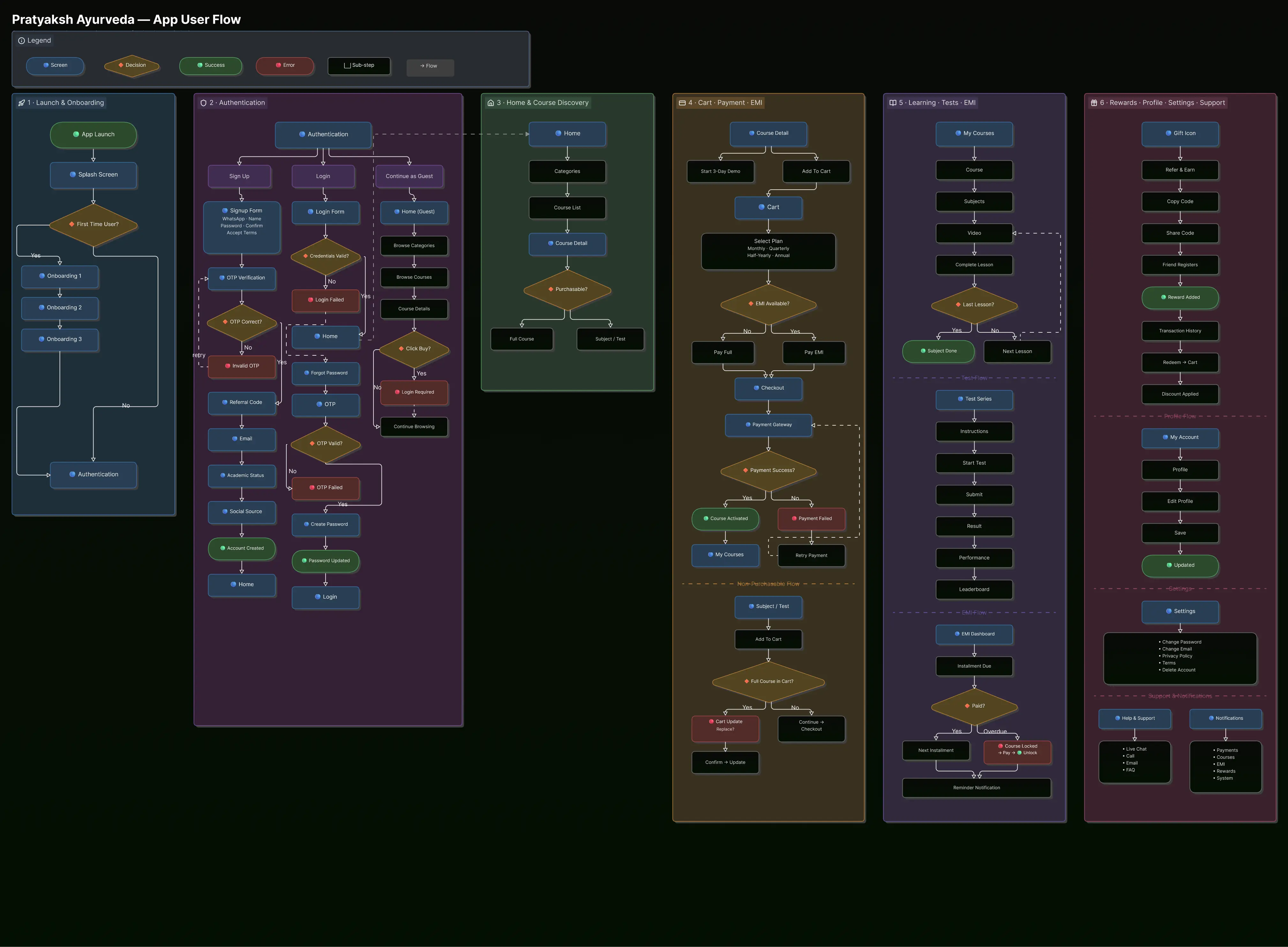
03 — First step: build the flow system

No flow maps existed.

So I made them.

No flow maps existed.

So I made them.

Before any screen design, I spent weeks mapping the entire product. Every user journey, every decision

point, every connection between screens. This became the foundation everything else was built on.

Step 01

Product Audit

Every screen reviewed. Every drop-

off point noted. App store reviews

read and categorised.

Every screen reviewed. Every drop- off point noted. App store reviews read and categorised.

Step 02

User Research

Hotjar heatmaps, scroll analysis,

competitor teardowns —

Unacademy, PrepLadder, ClassPlus.

Hotjar heatmaps, scroll analysis, competitor teardowns — Unacademy, PrepLadder, ClassPlus.

Step 03

Flow Mapping

Entire user journey mapped —

onboarding, discovery, purchase,

profile, settings, notifications.

Entire user journey mapped —

onboarding, discovery, purchase, profile, settings, notifications.

Step 04

Architecture

Information architecture rebuilt.

What lives where, what connects to

what, navigation structure.

Information architecture rebuilt.

What lives where, what connects to what, navigation structure.

Step 05

Design System

Component library built in Figma

before any screen work — colours,

typography, cards, buttons.

Component library built in Figma before any screen work — colours, typography, cards, buttons.

User Flow Map

04 — Onboarding, auth & guest mode

The first thing a student

sees had to work

The first thing a student

sees had to work

The entire sign up, login, forgot password, and onboarding flow was redesigned. Students can now explore

the app as a guest before committing — removing the biggest barrier to first-time users.

The entire sign up, login, forgot password, and onboarding flow was redesigned. Students can now explore

the app as a guest before committing — removing the biggest barrier to first-time users.

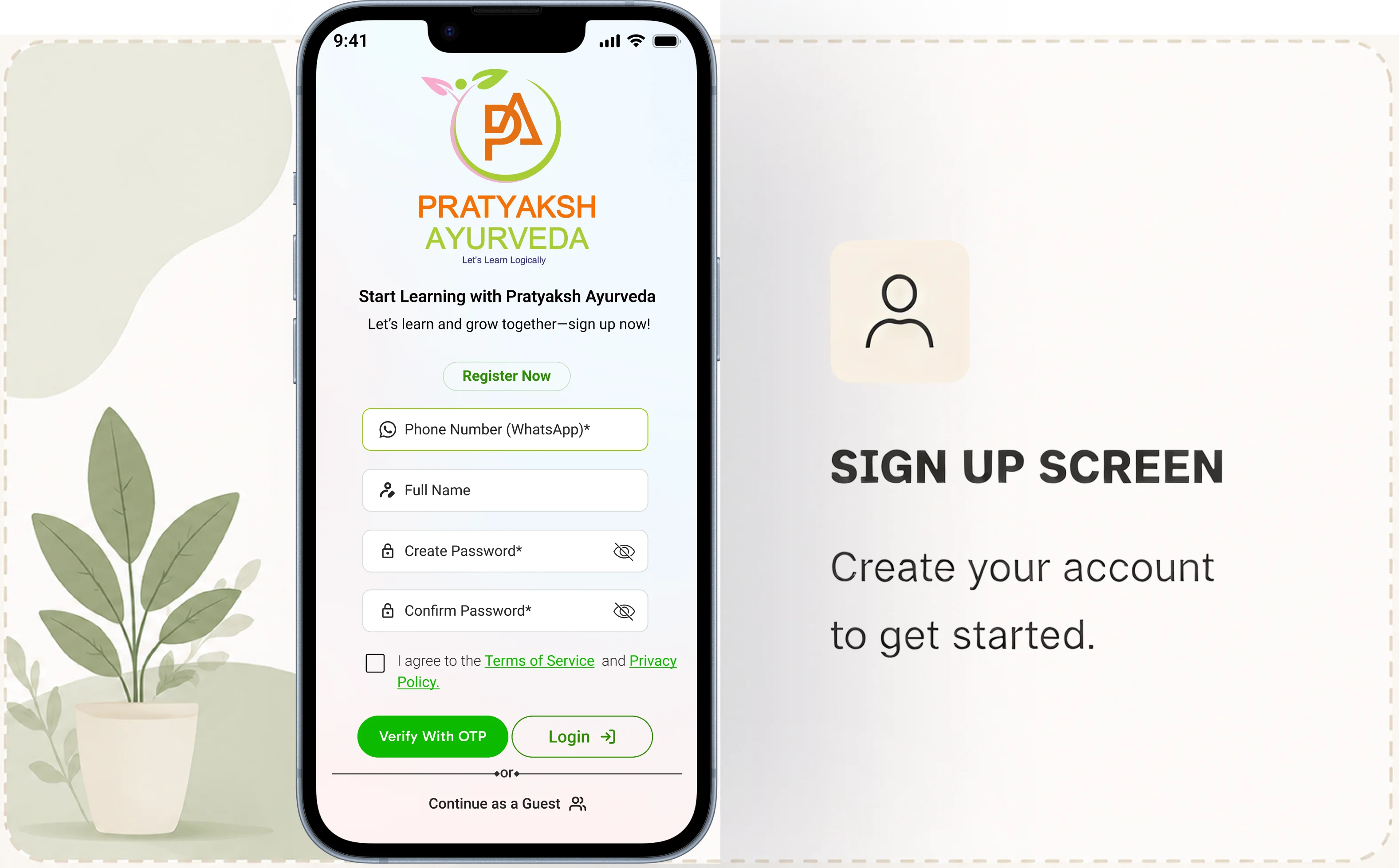
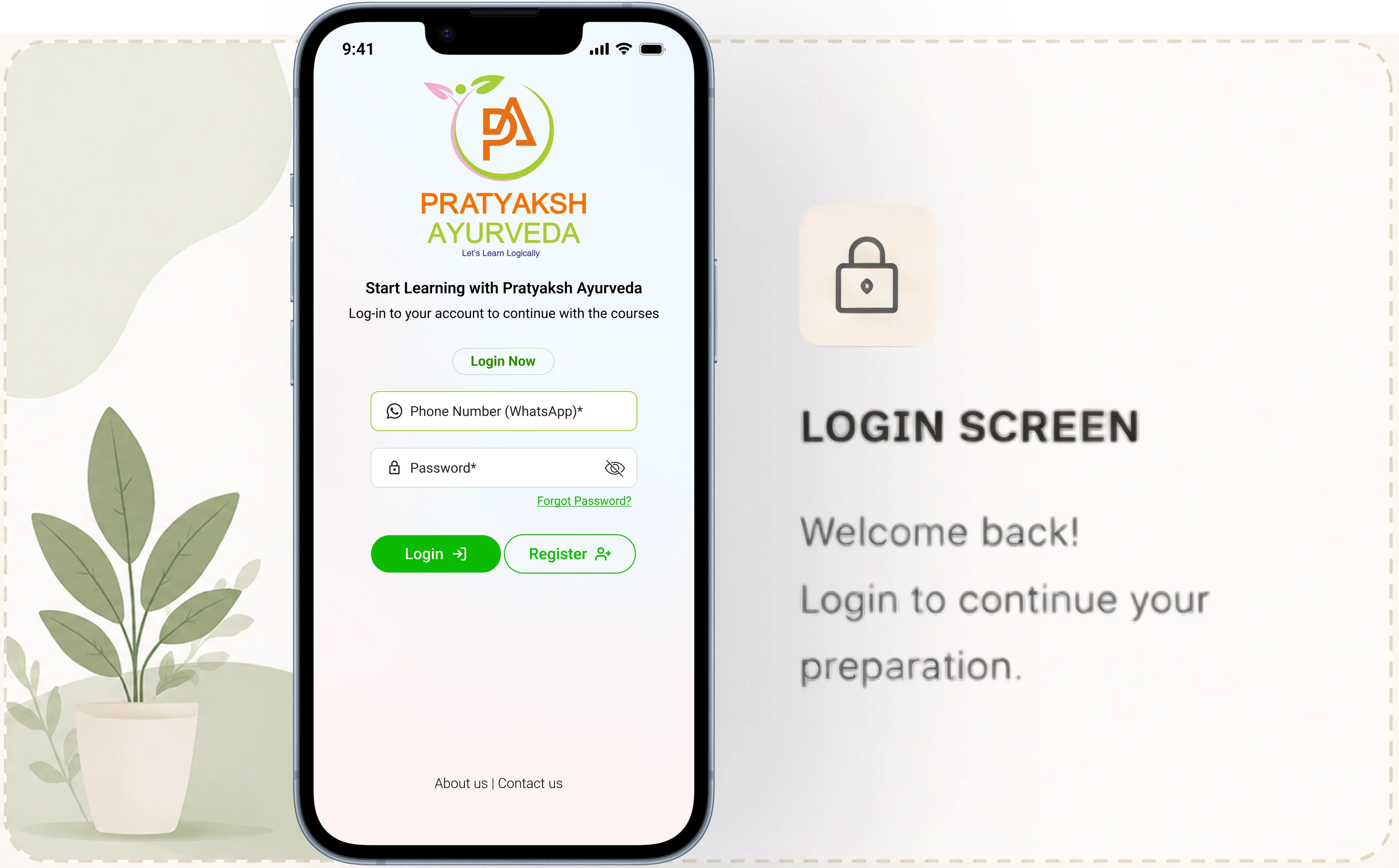
Auth Flow

Sign Up, Login, Forgot Password

Redesigned all auth screens — clean forms, clear error states, OTP verification,

and a password reset flow that actually makes sense. Each screen does one

thing and does it well.

Redesigned all auth screens — clean forms, clear error states, OTP verification, and a password reset flow that actually makes sense. Each screen does one thing and does it well.

Sign Up

Login

OTP

Forgot Password

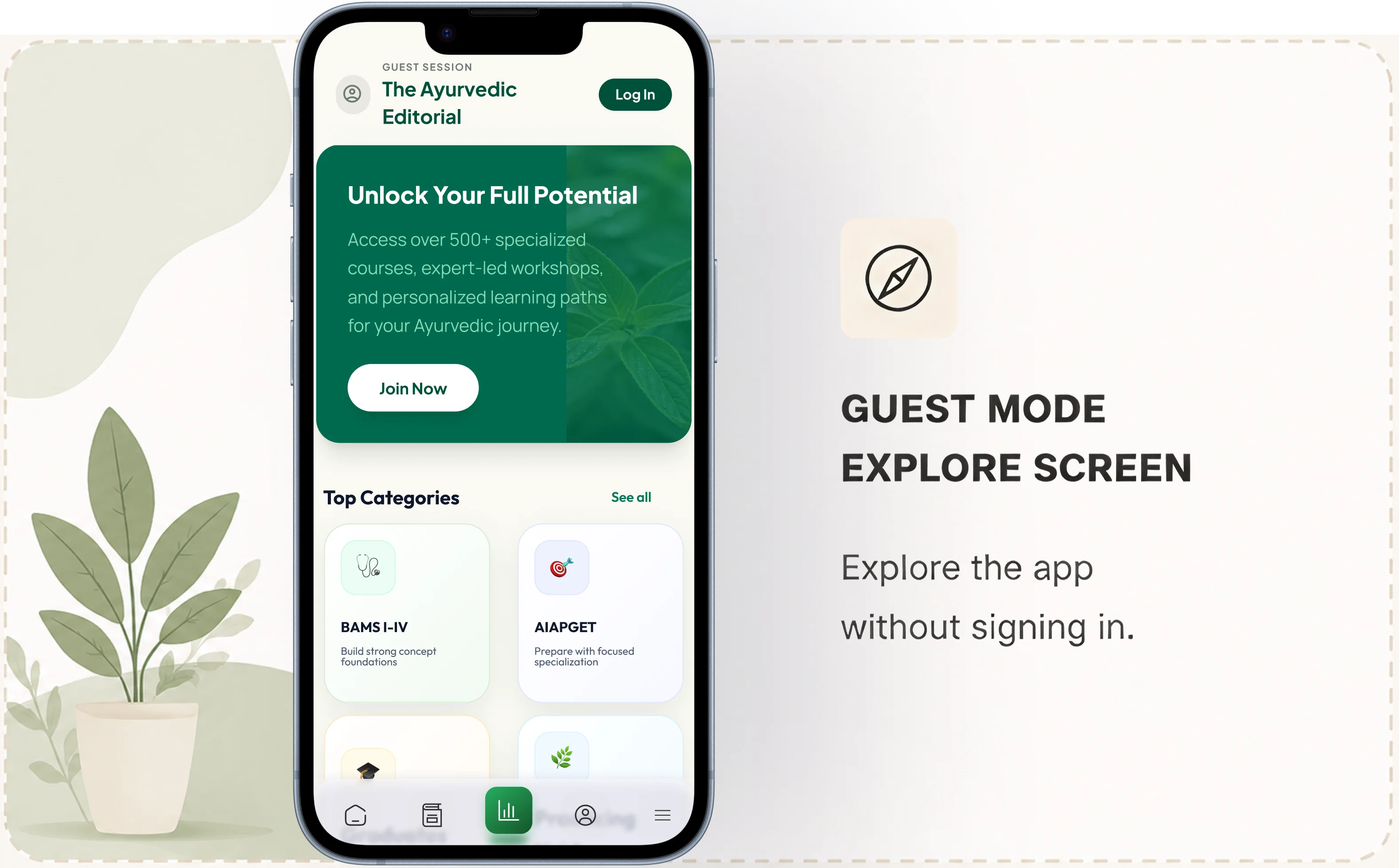
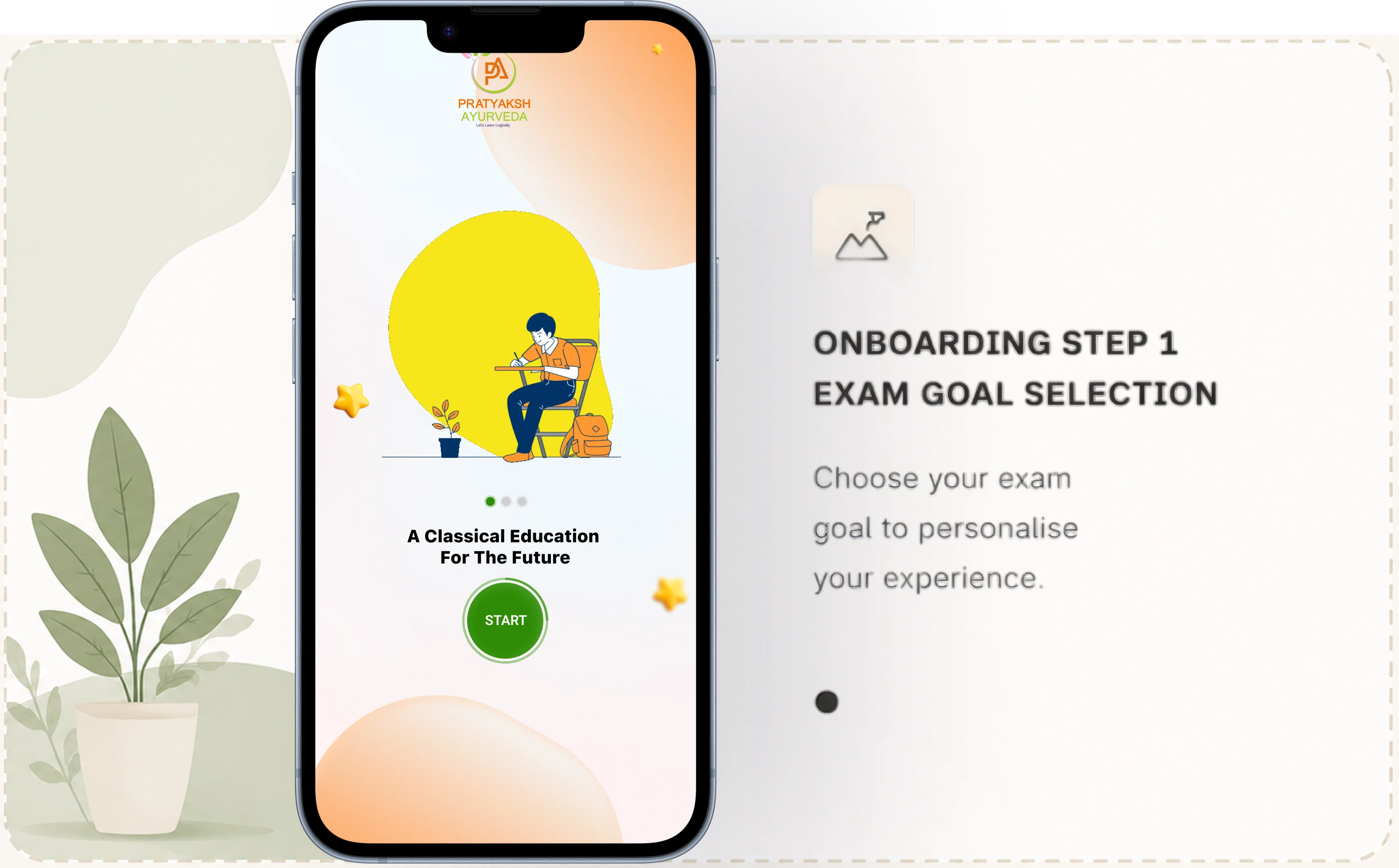
Onboarding

Progressive Onboarding + Guest Mode

The onboarding flow now asks one thing at a time — exam goal first, then

personalisation. A "Continue as Guest" option lets students explore courses

before creating an account. Drop-offs reduced significantly.

The onboarding flow now asks one thing at a time — exam goal first, then personalisation. A "Continue as Guest" option lets students explore courses

before creating an account. Drop-offs reduced significantly.

Onboarding

Guest Mode

Personalisation
05 — Home, discovery & navigation

Home page, categories,

and the full menu redesign

Home page, categories,

and the full menu redesign

The home page, categories, recommendation cards, mobile menu, and full navigation were all redesigned.

Students now land on a page that immediately shows them what's relevant to their goal.

The home page, categories, recommendation cards, mobile menu, and full navigation were all redesigned.

Students now land on a page that immediately shows them what's relevant to their goal.

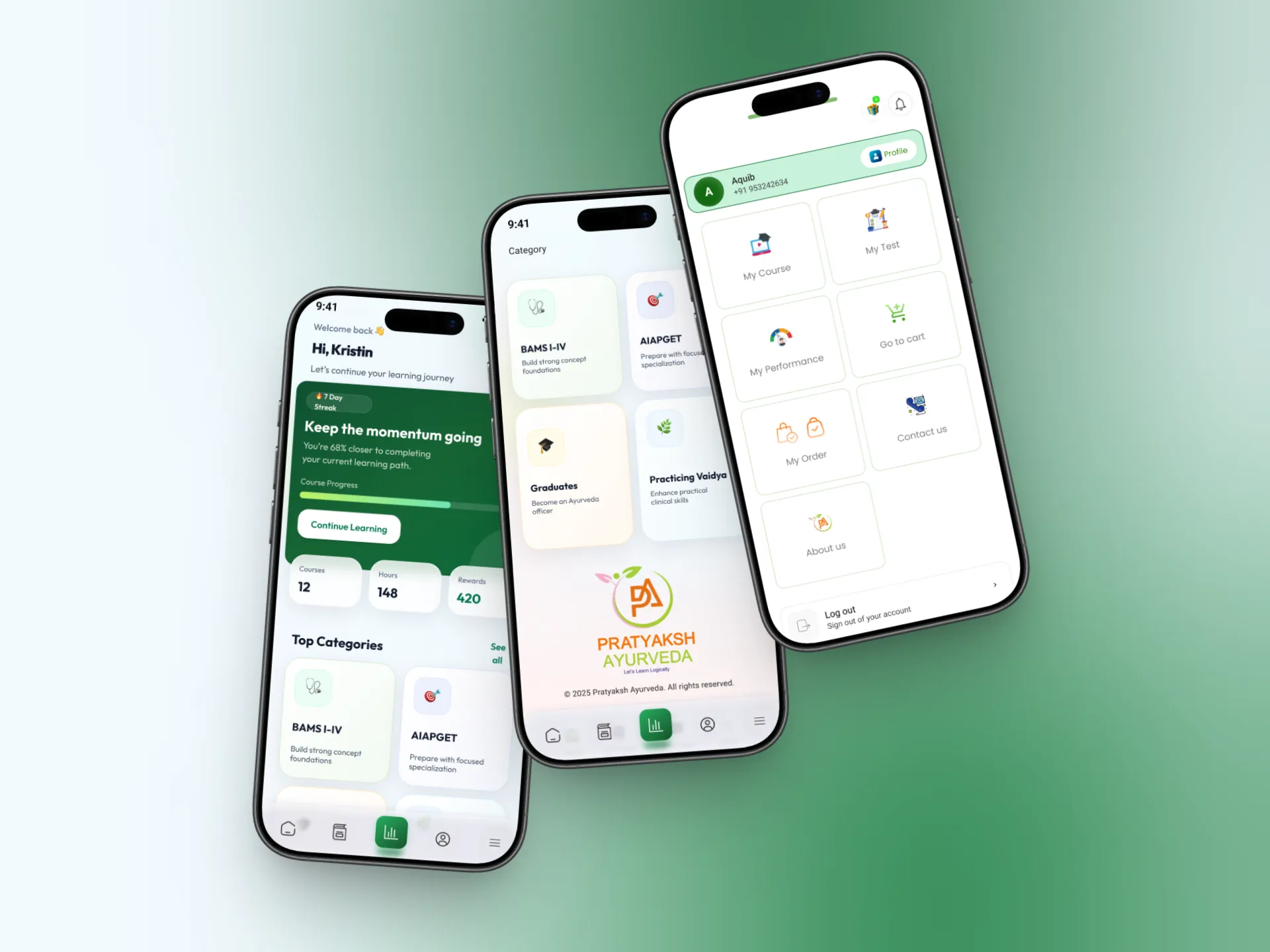
Home

Home Page Redesign

Personalised home screen based on the student's exam goal. Recommendation

cards surface the right courses first. Continue learning strip for enrolled

students. Live class banners, test series reminders, and announcement banners

all structured and prioritised.

Personalised home screen based on the student's exam goal. Recommendation cards surface the right courses first. Continue learning strip for enrolled

students. Live class banners, test series reminders, and announcement banners all structured and prioritised.

Home

Recommendations

Personalisation

Navigation

Full Menu Redesign

The mobile menu and navigation were completely redesigned. Clear bottom

navigation, a full side menu with all sections accessible, and consistent back

navigation throughout every screen. Getting lost in the app is no longer possible.

The mobile menu and navigation were completely redesigned. Clear bottom navigation, a full side menu with all sections accessible, and consistent back navigation throughout every screen. Getting lost in the app is no longer possible.

Mobile Menu

Navigation

IA

Discovery

Categories + Course Cards

Tab-based category filtering — BAMS / AIAPGET / AMO / Clinical. Redesigned

course cards now show faculty, duration, format (live/recorded), student count,

and price at a glance. No more opening a course just to find basic info.

Tab-based category filtering — BAMS / AIAPGET / AMO / Clinical. Redesigned course cards now show faculty, duration, format (live/recorded), student count, and price at a glance. No more opening a course just to find basic info.

Categories

Course Cards

Filtering

Content

Course, Subject & Test Series Pages

Individual course pages, subject-level detail pages, and test series pages all

redesigned with clear hierarchy. What's included, who teaches it, how long it is,

what the price is — all visible before scrolling.

Individual course pages, subject-level detail pages, and test series pages all redesigned with clear hierarchy. What's included, who teaches it, how long it is, what the price is — all visible before scrolling.

Course Page

Subject Page

Test Series

06 — Payment flow — 9 versions to get it right

Add to cart went through

9 versions

Add to cart went through

9 versions

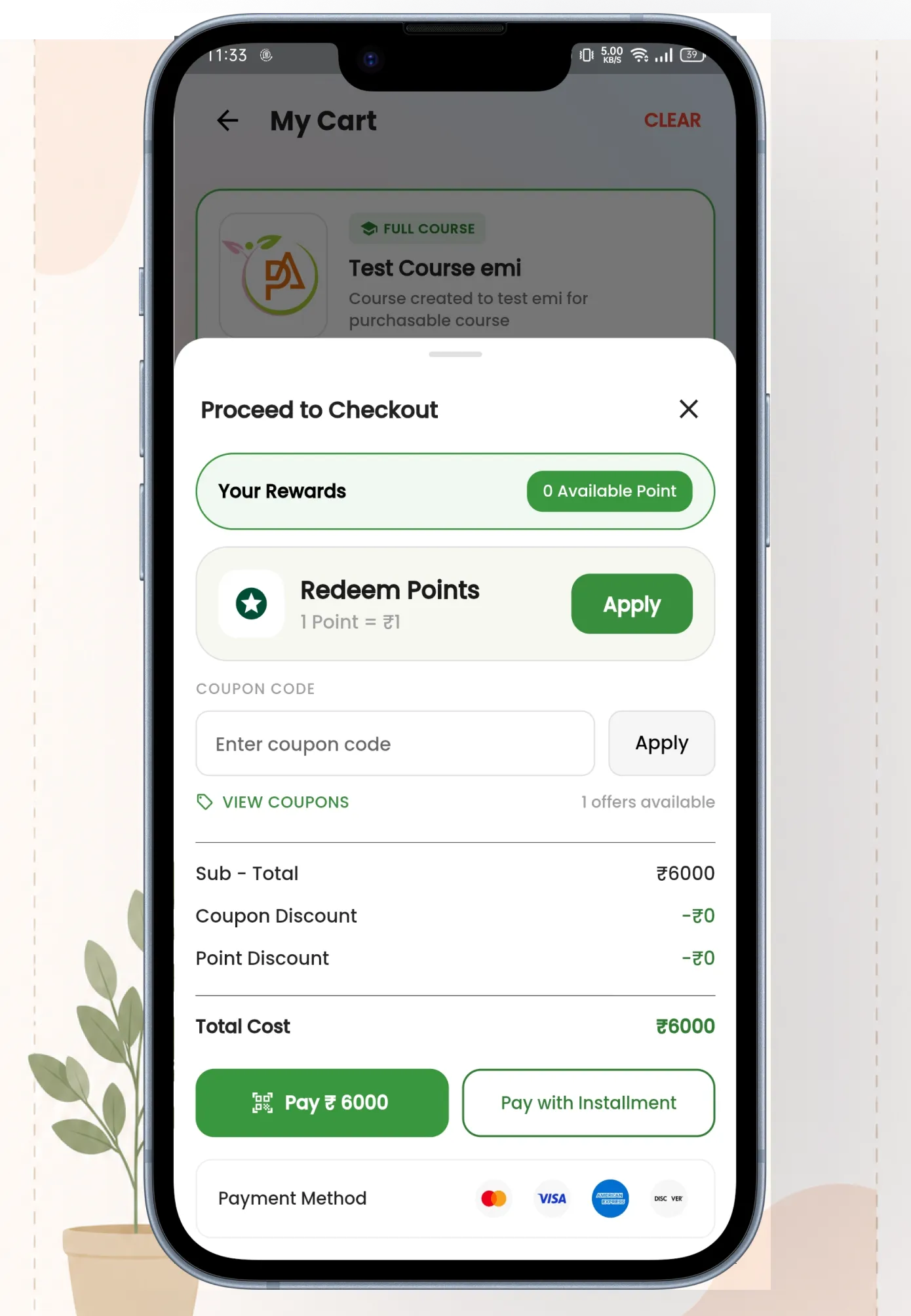
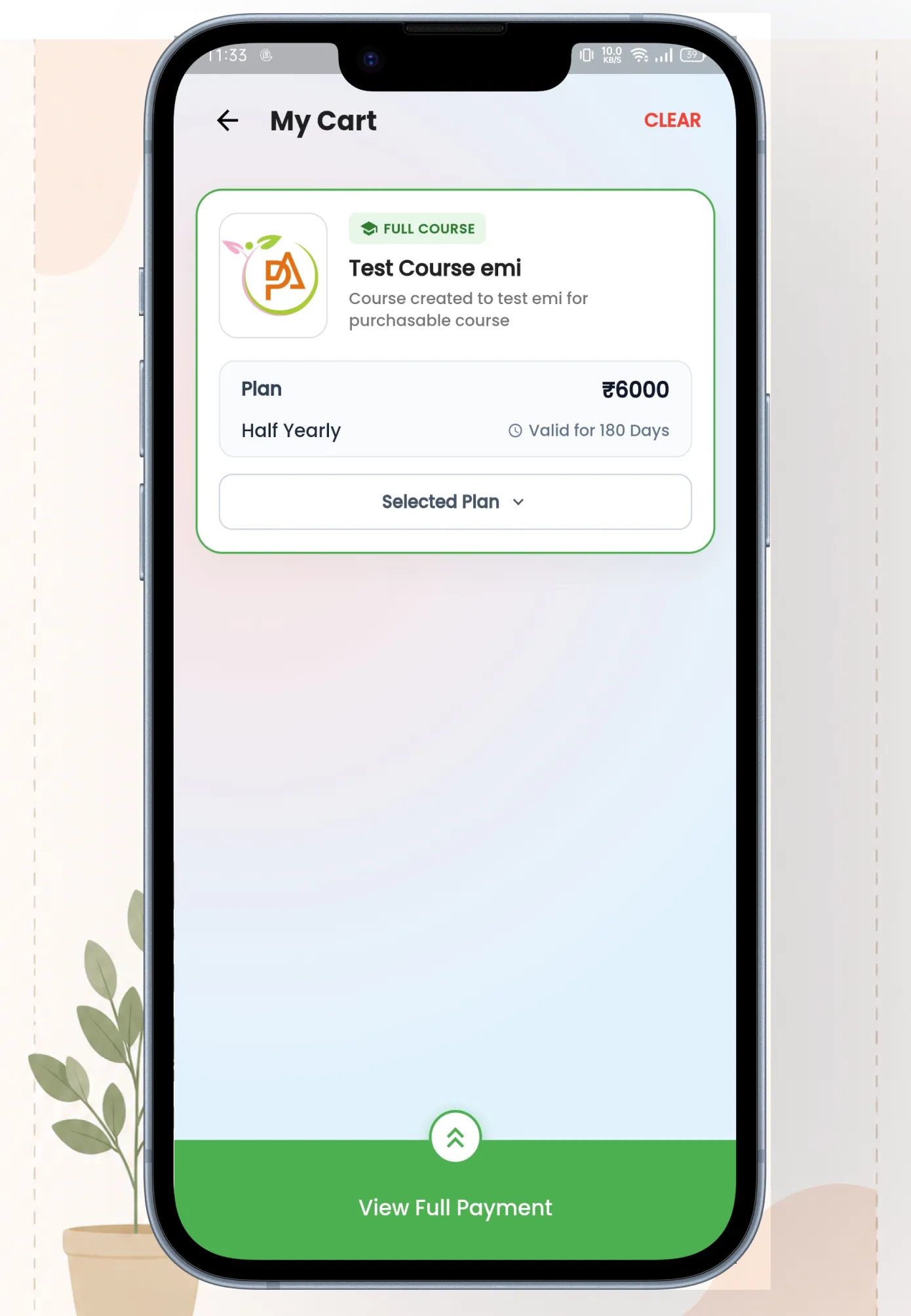
The payment flow was the hardest part of this project. It went through 9 complete versions before it was

right. Each version revealed something new — missing trust signals, confusing EMI logic, coupon and point

discount interactions that didn't work together. Version 9 is the one that made it.

The payment flow was the hardest part of this project. It went through 9 complete versions before it was

right. Each version revealed something new — missing trust signals, confusing EMI logic, coupon and point

discount interactions that didn't work together. Version 9 is the one that made it.

v1

Basic checkout

v2

+ Price

breakdown

v3

+ Coupon code

v4

+ Point discount

v5

+ EMI option

v6

+ Offline EMI

v7

+ Trust signals

v8

+ UX research

fixes

v9 ✓

Final — all

working
07 — Custom EMI system

Online + offline EMI.

Built from scratch.

Online + offline EMI.

Built from scratch.

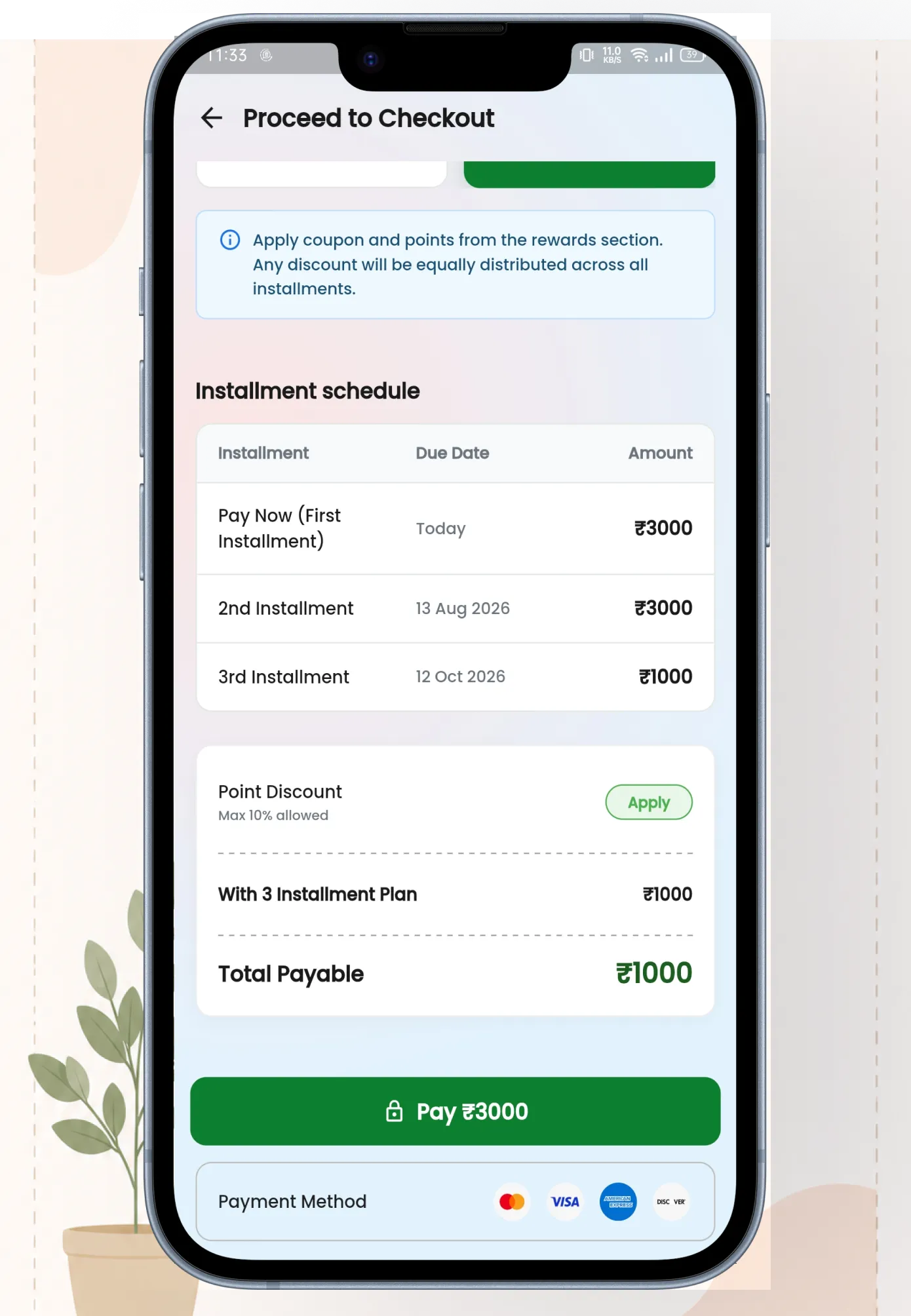
This was entirely new — Pratyaksh had no EMI system before. Students can now pay for courses in

installments: quarterly, half-yearly, or annually. Both online (payment gateway) and offline (manual

payment) options are supported. If an EMI is overdue, the course locks automatically until payment is made.

This was entirely new — Pratyaksh had no EMI system before. Students can now pay for courses in

installments: quarterly, half-yearly, or annually. Both online (payment gateway) and offline (manual

payment) options are supported. If an EMI is overdue, the course locks automatically until payment is made.

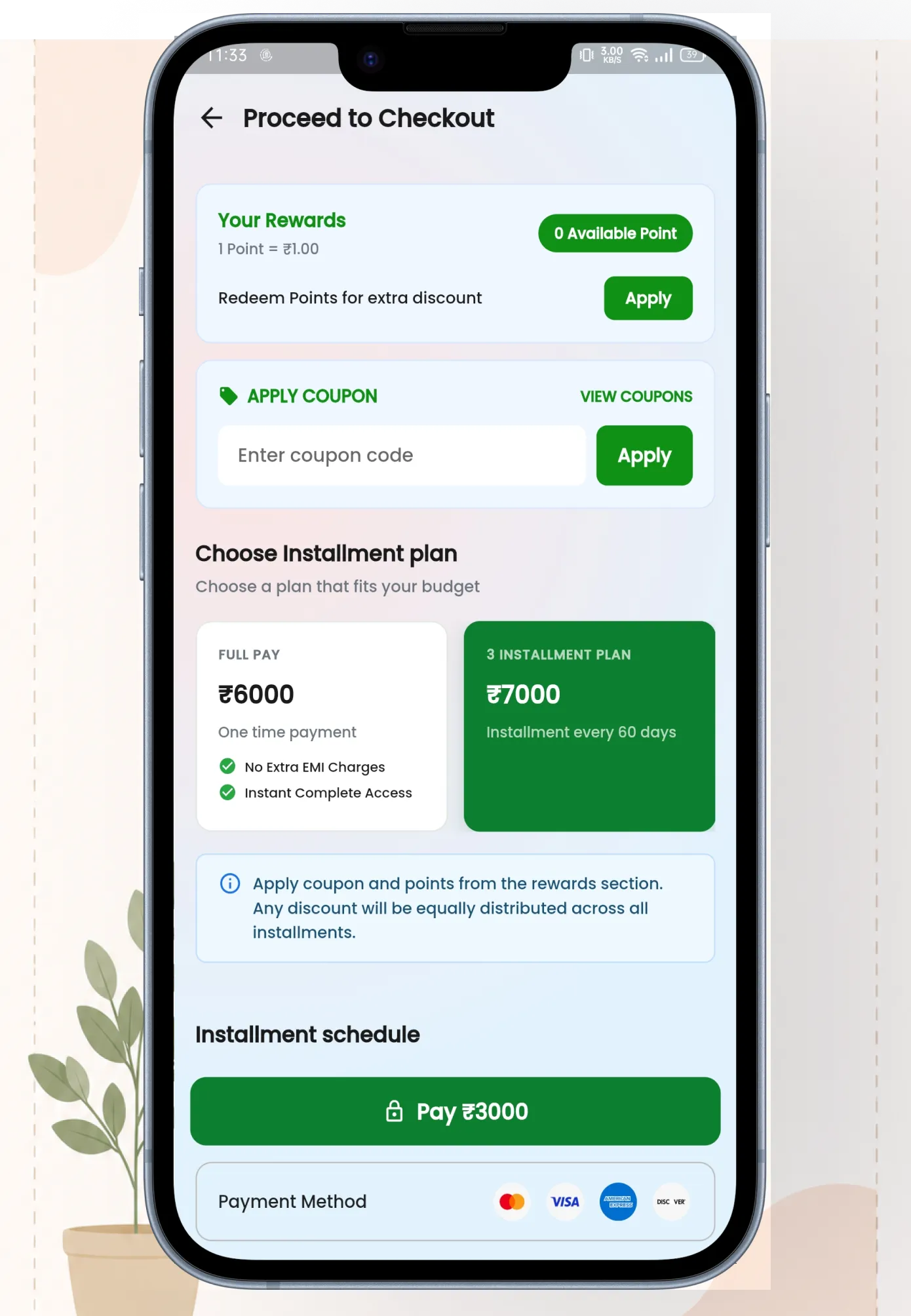
Three EMI Plans

Quarterly, half-yearly, and annual payment plans.

Each plan shows the total price, installment

amount, due dates, and how much the student

saves compared to paying in full.

Quarterly · Half-Yearly · Annual

EMI Schedule View

Students can see their complete EMI schedule —

every installment, due date, amount, and status

(paid, upcoming, overdue). Full transparency so

there are no surprises.

EMI Schedule

Online + Offline Payments

Online EMI goes through the payment gateway

with automatic reminders. Offline EMI lets

students pay via bank transfer or in person —

admin marks it as paid from the backend. Both

tracked in one place.

Online · Offline

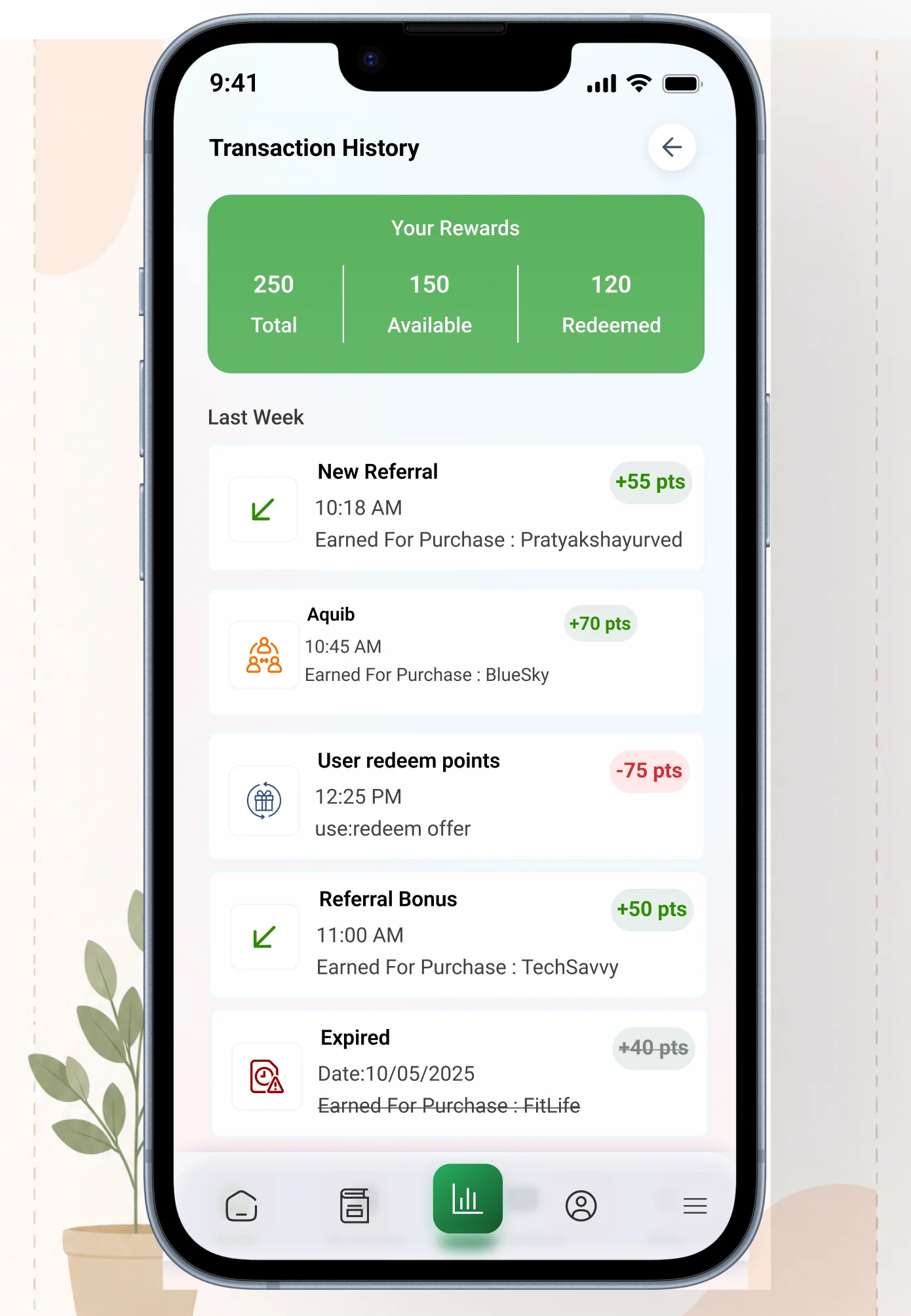
Transaction History

Complete transaction history for every payment

— full payments, EMI installments, refunds, point

redemptions. Filterable by date and course.

Downloadable receipt for each transaction.

History · Receipts

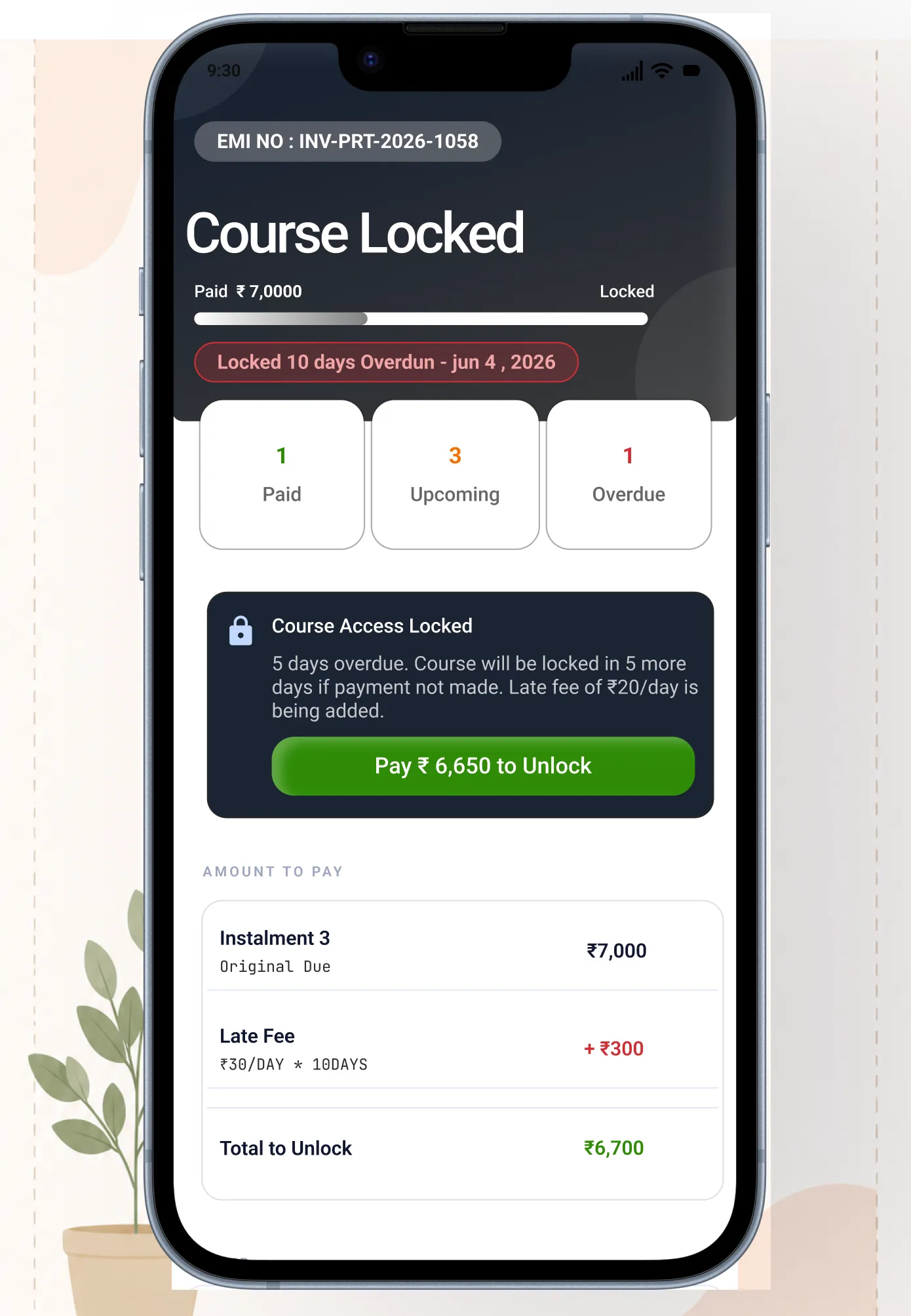
Course Lock on Overdue

If a student misses an EMI payment, their course

access is automatically locked. The app shows

exactly which payment is overdue, how much is

due, and a direct link to pay. Clear, not punishing.

Auto Lock · Overdue Alert

Admin Controls

EMI punctuality rules set from the backend by

the client. Grace period, late fees, lock timing —

all configurable. Admin can manually mark offline

payments and override locks when needed.

Backend Configurable
08 — Referral & points system

Refer a friend, earn points,

get a discount

Refer a friend, earn points,

get a discount

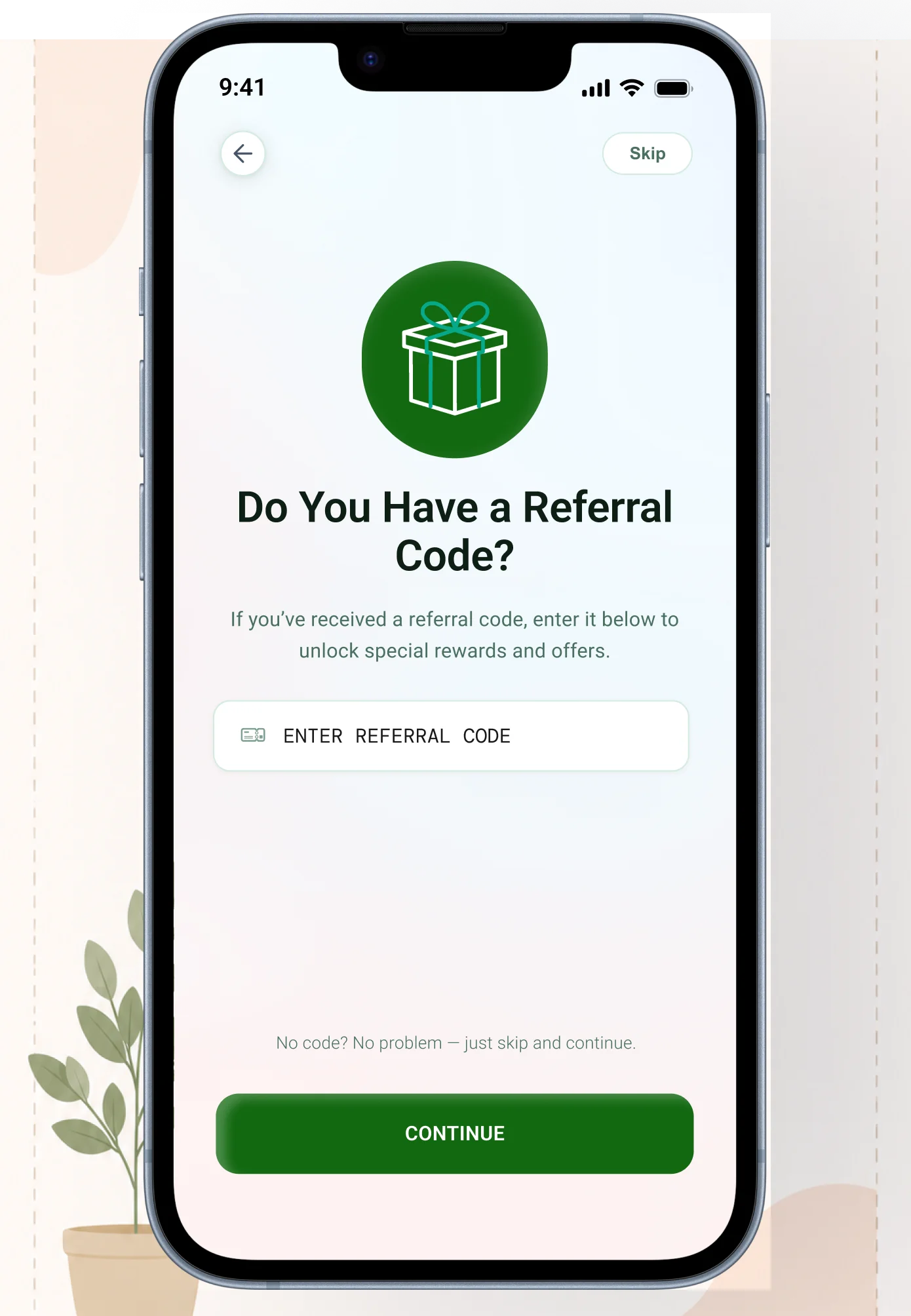
Students can enter a referral code to earn points. Those points can be redeemed for a discount on any

course — up to 10% of the course price, configurable from the admin backend. The system creates a real

incentive to refer friends and rewards loyalty.

Students can enter a referral code to earn points. Those points can be redeemed for a discount on any

course — up to 10% of the course price, configurable from the admin backend. The system creates a real

incentive to refer friends and rewards loyalty.

Share Referral Code

Student shares their unique referral code

with a friend

Points Credited

Both users earn points — credited

automatically to their account

Friend Signs Up

New user signs up using the referral code

during onboarding

Use at Checkout

Points redeemable for up to 10% discount

on any course purchase
09 — Real-time notifications

Notifications from both

user and admin side

Notifications from both

user and admin side

A real-time notification system was designed for both the user-facing app and the admin panel. Students

get notified about new live classes, EMI reminders, course updates, test results, and promotional

announcements. Admins can push targeted notifications to specific user segments.

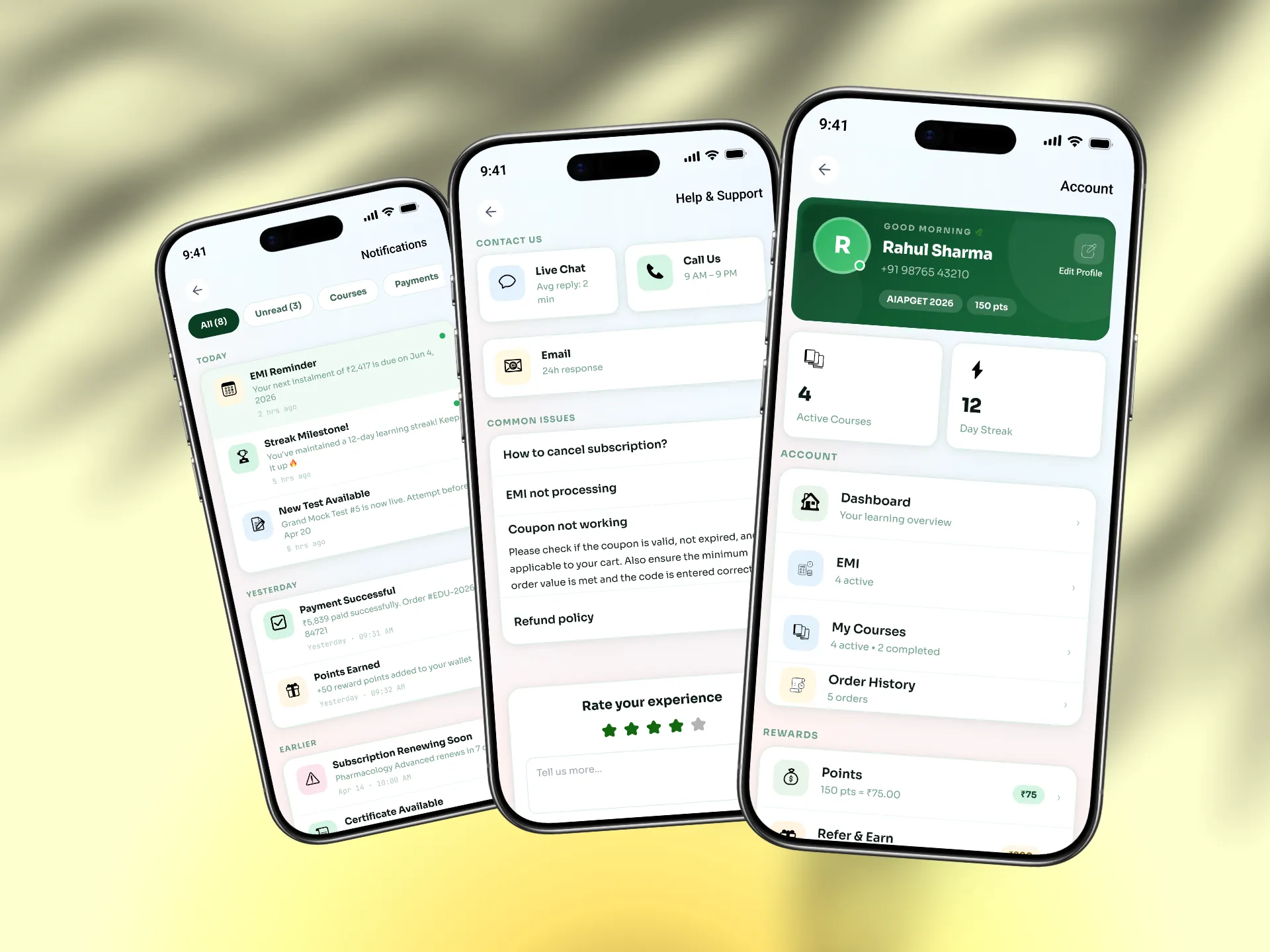
User Side

Student Notification Modal

Real-time notifications for live class reminders, EMI due dates, new course

announcements, test results, point credits, and promotional offers. Grouped by type, with read/unread states and a clear notification centre.

Real-time notifications for live class reminders, EMI due dates, new course announcements, test results, point credits, and promotional offers. Grouped by type, with read/unread states and a clear notification centre.

Real-time

Grouped

Read States

Admin Side

Admin Notification Controls

Admins can push targeted notifications to all users, specific course enrollees, or students with overdue EMIs. Scheduled notifications for upcoming live classes and test series automatically sent at set times.

Targeted

Scheduled

Admin Panel

10 — User profile, settings & help

The complete user account

experience

The complete user account

experience

The user profile was designed, then deleted, then completely redesigned 2 months later. The final version

covers everything a student needs to manage their account, track their learning, and get help — all in one

structured place.

The user profile was designed, then deleted, then completely redesigned 2 months later. The final version

covers everything a student needs to manage their account, track their learning, and get help — all in one

structured place.

Profile Dashboard Tabs

User Profile

Dashboard

My Courses

Order History

Points

Reports

Notifications

Settings

Help & Support

Logout

Profile

User Profile — Edit Permissions

Students can update their profile image, email address, phone number,

password, and current study status. Each field has proper validation and

confirmation flows. Profile completion percentage encourages students to fill everything in.

Students can update their profile image, email address, phone number, password, and current study status. Each field has proper validation and

confirmation flows. Profile completion percentage encourages students to fill everything in.

Profile Image

Email

Phone

Password

Study Status

Settings

Settings — Full Control

Change password, change email, privacy policy, terms & conditions, and a delete

account flow with confirmation. The delete account flow was designed carefully

— clear warning, confirmation step, and what happens to their data explained

plainly.

Change password, change email, privacy policy, terms & conditions, and a delete account flow with confirmation. The delete account flow was designed carefully clear warning, confirmation step, and what happens to their data explained plainly.

Change Password

Change Email

Privacy

Delete Account

Help

Help & Support

Multiple support channels in one place — chat, call, email, and a feedback form.

FAQs organised by topic. Students can report a problem with their course

directly from the course page, which routes to support with context already

attached.

Multiple support channels in one place — chat, call, email, and a feedback form. FAQs organised by topic. Students can report a problem with their course directly from the course page, which routes to support with context already attached.

Chat

Call

Email

Feedback

Performance

My Performance & Reports

Students can track their test series performance, see their scores over time,

compare against other students, and identify weak subject areas. The points

report shows how many points they've earned, spent, and have remaining.

Students can track their test series performance, see their scores over time, compare against other students, and identify weak subject areas. The points report shows how many points they've earned, spent, and have remaining.

Test Scores

Progress

Points Report

11 — What changed

Every screen redesigned.

A complete new product.

Every screen redesigned.

A complete new product.

This wasn't a refresh. The app that exists now is fundamentally different from what I started with. Every

screen, every flow, every state was thought through from scratch.

This wasn't a refresh. The app that exists now is fundamentally different from what I started with. Every

screen, every flow, every state was thought through from scratch.

9+

Payment flow versions tested before

final

100%

Of screens redesigned — nothing left

untouched

EMI

Entirely new payment system —

online + offline

0→4

Flow maps built from scratch — none

existed before

The EMI system was the most impactful addition. Before it existed, students

paying ₹10,000–₹15,000 for a full AIAPGET prep course had to pay

everything upfront. That was a conversion killer for the higher-priced

courses. Now students can pay quarterly or half-yearly — and course

enrollment for premium courses went up significantly after launch.

The EMI system was the most impactful addition. Before it existed, students paying ₹10,000–₹15,000 for a full AIAPGET prep course had to pay everything upfront. That was a conversion killer for the higher-priced

courses. Now students can pay quarterly or half-yearly — and course enrollment for premium courses went up significantly after launch.

The EMI system was the most impactful addition. Before it existed, students paying ₹10,000–₹15,000 for a full AIAPGET prep course had to pay everything upfront. That was a conversion killer for the higher-priced courses. Now students can pay quarterly or half-yearly — and course enrollment for premium courses went up significantly after launch.

The payment flow going through 9 versions wasn't a failure — it was the

process working. Each version fixed something the previous one missed.

The final version has full payment, EMI, coupon discount, point discount,

transaction history, and offline payment all working together cleanly. Getting

there took time, UX research, and multiple rounds of testing with real users.

The payment flow going through 9 versions wasn't a failure — it was the process working. Each version fixed something the previous one missed. The final version has full payment, EMI, coupon discount, point discount,

transaction history, and offline payment all working together cleanly. Getting there took time, UX research, and multiple rounds of testing with real users.

12 — What I learned

Honest reflections

after this project

Honest reflections

after this project

Map before you design

No flow maps existed when I started. Building

them first — before any screen work — was the

single most important decision I made on this

project. It saved weeks of redesign.

Android first, always

87%+ of users were on Android. Designing for iOS

aesthetics first would have been wrong. Tap

targets, bottom sheets, back navigation — all

designed for how Android users actually interact.

9 versions is normal

The payment flow went through 9 versions. That's

not failure — that's design working properly. Each

version was better because of what the previous

one taught us. Ship, learn, iterate.

Deleting and rebuilding is okay

The user account section was designed, deleted,

and rebuilt completely. The second version was

much better. Sometimes the right move is to start

over rather than patch something that's

fundamentally wrong.

Payment UX is trust design

For students spending ₹5,000–₹15,000, every

element of the payment screen is a trust

decision. Security signals, clear pricing, and EMI

transparency aren't features — they're conversion

tools.

Real testing changes everything

The difference between v1 and v9 of the payment

flow came entirely from real user testing and UX

research. No amount of solo thinking replaces

watching a real student try to use what you built.

Mohd Aquib Javed

UI/UX Designer & WordPress Developer · Lucknow, India · Open to full-time, freelance

Want to work together?

nemesisgraphic19@gmail.com

Create a free website with Framer, the website builder loved by startups, designers and agencies.